3 October 2026 · YouTube Ban Service · ~12 min read
YouTube channel username checker: what the address test misses, and the check that's final
A YouTube channel username checker can only see whether youtube.com/@name loads a channel. That catches handles in use, not every unavailable one: a deleted or terminated channel's address, or a name that breaks the 3–30 character rules, can return the same 404 and look free. The only definitive check is the handle field at youtube.com/handle, signed in.
What can a YouTube channel username checker actually see?
Only the public address. Whether it's a website, a browser extension or a script, a YouTube channel username checker sends a request to youtube.com/@name without signing in and reads what comes back. If a channel page loads, the name is taken. A redirect usually means taken too, with the handle pointing at an older address. A 404 gets labelled "available", and that last step is a guess.
YouTube's real availability check is the handle field, and the handle field sits behind a Google sign-in. When we requested youtube.com/handle signed out on 3 October 2026, the server answered with a 303 redirect to accounts.google.com. An open-source handle-availability script on GitHub gets past that in the only way it can, by reusing network requests captured from a signed-in session in the handle editor. Its README says fresh Google accounts won't work, and warns that the account running it could get banned. So a username checker for YouTube that promises instant results with no login is checking addresses. It isn't checking YouTube's rules.
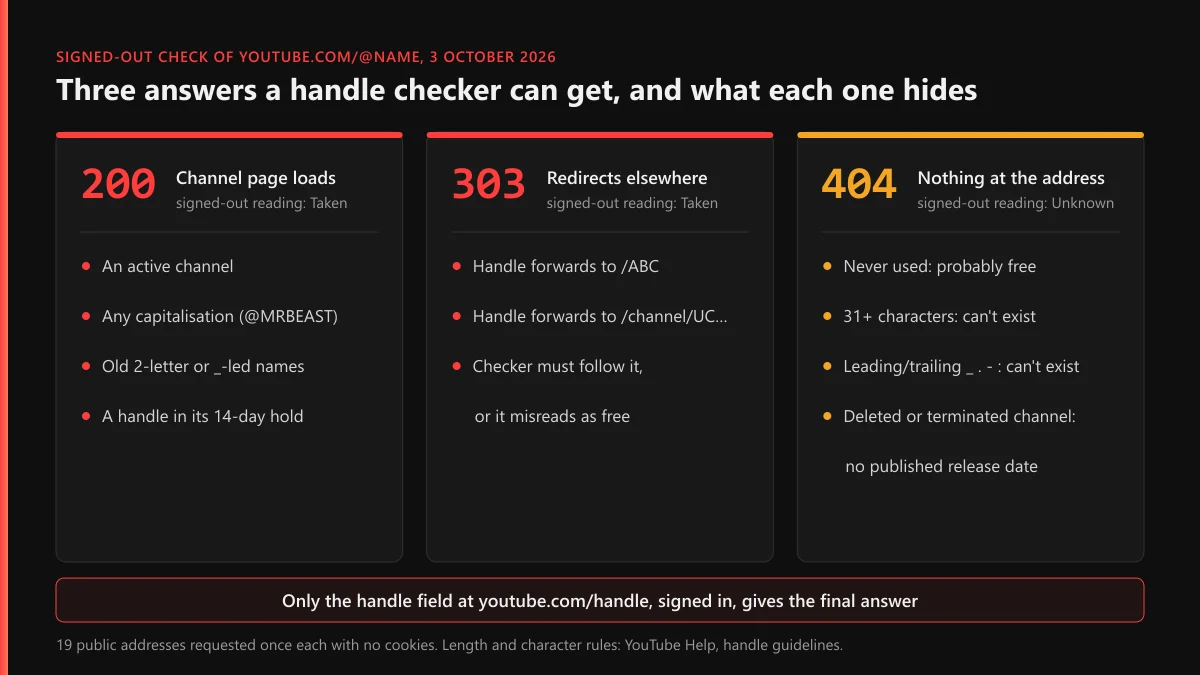
What did 19 addresses return when we checked them on 3 October 2026?
We wanted to see exactly where the signed-out test breaks, so we requested 19 public addresses once each from a script with no cookies, and logged the HTTP status and where any redirect pointed. Volume wasn't the point. Each address sits on a different edge of the rules.
| Address requested | What came back | What a checker should conclude |
|---|---|---|
| @MrBeast, @mrbeast, @MRBEAST | 200, the same MrBeast channel page all three times | Taken. Capital letters make no difference |
| @abc, @ABC, @Abc | 303, all forwarding to youtube.com/ABC | Taken. The handle points at an older vanity address |
| @TeamYouTube | 303 to a /channel/UC… address | Taken |
| @ab | 200, a channel called /AB | Taken, though a new handle needs at least 3 characters |
| @_abc | 200, a live channel | Taken, though the guidelines bar an underscore at the start |
| @12345 | 200 | Taken. Digits-only handles exist |
| 30 × the letter a | 200 | Taken. 30 characters is the ceiling |
| 31 × the letter a | 404 | Not free: it breaks the length rule |
| @abc_ | 404 | Not free: an underscore can't end a handle |
| @zqxv7k2m9pltrw, @name-with-dash | 404 | Probably free. Only the handle field can confirm it |
| /user/TheAlexJonesChannel | 404 | A channel YouTube terminated in 2018. Same 404 as an unused name |
| /user/MrBeast6000 | 200, the MrBeast channel | Legacy usernames still serve |
| /c/MrBeast6000 | 404 | Same word, different namespace. Proves nothing about the name |
| youtube.com/handle | 303 to the Google sign-in page | The real check needs an account |
Three things in that table should change how you read any YouTube handle check. Capital letters don't matter: @mrbeast and @MRBEAST opened the same channel as @MrBeast, so trying case variants of a taken name is wasted effort. The rules describe what you can pick today, not what already exists, which is why two-character @ab and underscore-led @_abc both loaded live channels. And a 404 covers very different situations. The 31-letter string can never be a handle. The terminated channel's old address has no release date that YouTube publishes. @zqxv7k2m9pltrw is probably free. A checker paints all three the same shade of green.
One redirect ran the opposite way from YouTube's own help page
YouTube's page Understand your channel's URLs says all legacy URLs "now redirect users to your new channel URL that is based on your handle." The answer we got for @abc on 3 October ran the other way: it forwarded to youtube.com/ABC, an old vanity address, while /c/YouTubeCreators, the example on that same help page, loaded directly with a 200. Any checker that counts only a 200 as taken, and doesn't follow redirects, would have reported @abc as free.
How do you check YouTube handle availability inside YouTube itself?
Type the name into the handle field. It's the one YouTube handle checker that knows about held, reserved and rule-breaking names, because it belongs to the system that enforces them. It works for a channel you're setting up and for renaming an old one, and nothing changes until you press publish.
- Sign in with the Google account that owns the channel, then open youtube.com/handle. In YouTube Studio the same field is under Customization, then Profile.
- Under Handle, type the name you want without the @. YouTube adds it for you.
- Read the answer before you touch anything else. If the name can't be used, YouTube's help page on changing, viewing or hiding your handle suggests adding periods, numbers or underscores, and says a refusal is "usually because another channel is already using it or it didn't meet our handle naming guidelines."
- Publish only once you're sure. A published change counts toward the limit of two changes in 14 days. Typing candidates into the field doesn't.
That's the whole answer to how to check YouTube username availability properly: four steps, about a minute, and a result that comes from YouTube rather than from a third party's reading of a status code.
Which handle rules make a name unavailable before anyone owns it?
YouTube's handle guidelines set hard limits, and some names fail them before ownership even comes into it. A checker that only reads addresses never mentions these:
- Length: 3 to 30 characters, except 1 to 10 for Han and Hangul and 2 to 20 for Ethiopic, Hiragana and Katakana.
- Characters: letters or numbers from any of YouTube's 75 supported languages, plus underscores, hyphens, periods and Latin middle dots (·), none of which may start or end the handle.
- Shape: nothing that looks like a URL or a phone number.
- Content: nothing that breaks the Community Guidelines. The page names violent, offensive and spammy handles.
So a YouTube handle name checker that calls "@my.brand." available is wrong twice over. Nobody owns it, because nobody can. Our test hit the same wall from the other side: the 30-letter string was taken, and the 31-letter one came back 404 although the field would never accept it.
Handles are also separate from channel names. Your channel name can repeat someone else's, but your handle can't. That was the reason for handles when YouTube introduced them on 10 October 2022: unlike a channel name, a handle belongs to exactly one channel.
Is a YouTube username still something you can check and claim?
No. Both of the older name types are closed. YouTube's URL page says usernames "are no longer required for channels today", that existing ones "can't be changed", and that "new custom URLs can no longer be set up or changed." Old ones keep working, which is why /user/MrBeast6000 still loaded in our test. So when you check if a YouTube username is available, the answer that counts is about the handle, since it's the only name a new channel can pick.
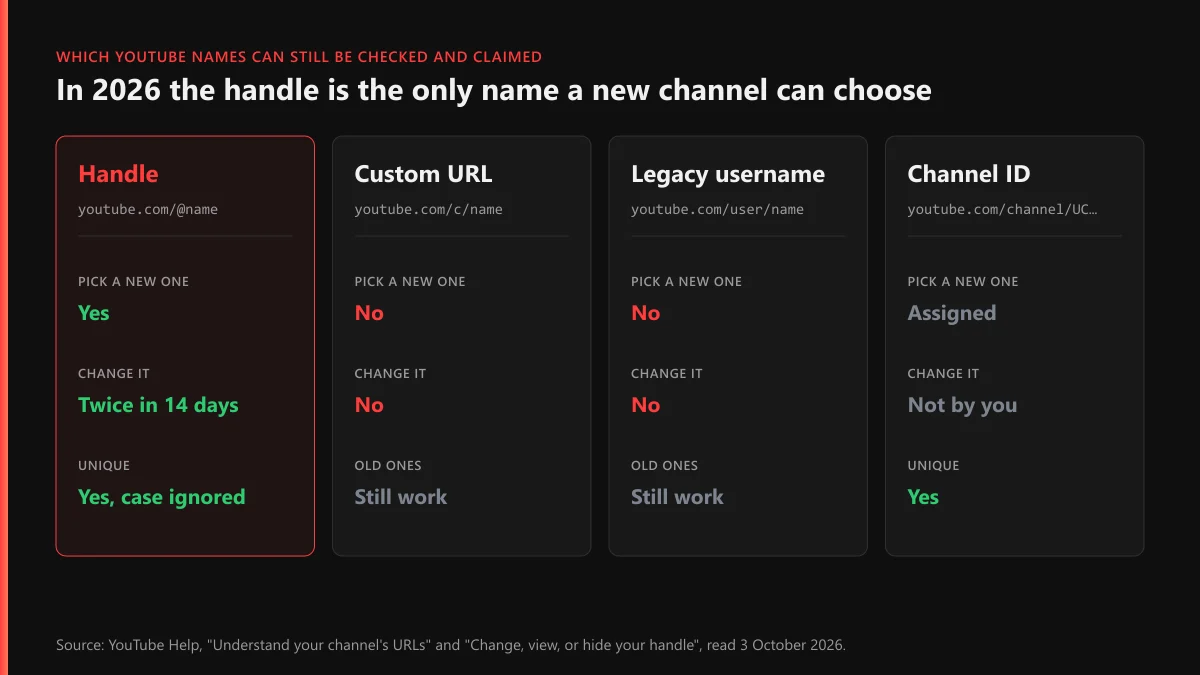
The old namespaces don't line up with each other either. /c/MrBeast6000 returned 404 while /user/MrBeast6000 loaded the channel, so a YouTube username availability checker that probes the wrong path can call a famous name free. Tools that sell a "youtube username checker and channel available" result in one go are really doing two lookups, the name and the channel behind it, and without a sign-in only the channel lookup is reliable. The claiming side, including what YouTube will and won't do about a name you think is yours, is on our page about claiming a YouTube username or handle.
When does a taken handle become free again?
YouTube publishes exactly one release timeline. When a channel changes its handle, YouTube holds the old one for 14 days so the owner can switch back, and both URLs work in that window. After that, the help page says, "the handle will become available for other users to select as their handle." A handle that was dropped yesterday therefore still reads as taken, because the old address keeps opening the channel until day 14.
Nothing else comes with a clock. The help pages give no release date for the handle of a deleted channel or a terminated one, and the unofficial figures on forums disagree with each other. If you're thinking of deleting a YouTube channel to reuse its handle elsewhere, assume the name is gone; hiding the channel keeps it. The gap between a terminated and a deleted channel matters for content and appeals, but neither state tells you when the name comes back.
Lost the channel rather than the name?
Then a checker won't help, because the handle is still yours and the problem is the account. Start with recovering a YouTube account, or the Gmail and Google account recovery underneath it, and if the recovery address is gone too, read getting back in without the email. Before paying anyone, compare what channel recovery costs with how recovery services actually work. A channel that was banned rather than hijacked goes through YouTube's unban and appeal route, and earning again afterwards takes a separate monetization appeal.
What if the handle you wanted belongs to someone pretending to be you?
Then it's no longer an availability question. It's an impersonation one, and YouTube deals with it through reports, not through the handle field. A channel that copies your name, picture and branding to pass as you or your company breaks YouTube's impersonation policy, and the remedy is removal of that channel. YouTube's handle pages describe no process for transferring a handle to someone else.
A fan account that says it's a fan account, or another creator who simply got there first, is a legitimate channel, and reporting it won't work and shouldn't. Force doesn't free names either: YouTube mass-report bots and the panels and bots selling YouTube bans don't do it, and nor do Instagram spam-report bots or Instagram mass-report tools when the same squatter holds the name there. What does get a channel removed is a real violation with evidence, which is the subject of our page on what actually gets someone banned from YouTube.
For a genuine impostor, work through these in order:
- Report the channel itself and choose impersonation. Our page on what a channel report is checked against explains why the channel, not a single video, is the right target.
- If your own channel was taken over, or the impostor spreads false claims about you, use the routes for hijacked channels and defamation.
- If they reupload your videos, that's copyright. A copyright removal request can lead to copyright strikes, and three within 90 days end a channel. Taking down a copycat's stolen videos covers the evidence, and how a copyright claim differs from a strike explains why a claim alone won't stop them.
- If they run scam ads or sell knock-offs under your brand, go through reporting YouTube scam ads or the counterfeit and misinformation routes.
- For single uploads and comment spam, see how to report a YouTube video, reporting reuploads and comments, and what happens after you report.
Harassment that arrives with the impersonation falls under YouTube's harassment policy, and exposed personal details go through a YouTube privacy complaint. When the whole channel exists to deceive, a full YouTube channel takedown through those official routes is the end state, and banning a channel that breaks the rules shows how YouTube weighs it. For one problem upload instead, read getting a single video taken down or see our YouTube content removal service.
Are third-party YouTube handle checkers safe to use?
Most are harmless and limited. A site that asks for a name and nothing else is running the signed-out test from the table above, so read its "available" as "no channel answers at this address today". That's useful for crossing names off a shortlist. It isn't permission.
Be stricter with anything that wants more. A yt username checker that asks you to sign in with Google, install an extension with access to every site, or paste in your cookies is asking for your account in exchange for an answer YouTube gives for free. The GitHub script that does use a session tells its own users to run it on an account they don't care about. There's no good reason to risk a channel you do care about to learn something the handle field shows in a second.
Nobody can legitimately sell you a taken handle, either. An offer to "free up" a name by reporting its owner is an offer to file false reports, from the same kind of seller the bots-and-panels page above describes. If the person holding your name really is impersonating you, our contact page lists every way to reach us, the full list of YouTube reporting guides covers each route on this page, and the YouTube Ban Service home page explains how we work: genuine violations only, through YouTube's own channels.
FAQ
Is a 404 at youtube.com/@name proof that the handle is free?
No. A 404 only means no channel answers at that address. Names that break the length or character rules, and the addresses of deleted or terminated channels, return the same 404. The handle field at youtube.com/handle, signed in, is the only check that gives a final answer.
Are YouTube handles case sensitive?
No. In our 3 October 2026 test, @MrBeast, @mrbeast and @MRBEAST opened the same channel, and @abc, @ABC and @Abc all redirected to the same address. Trying a different capitalisation of a taken handle won't find you a free one.
How long can a YouTube handle be?
3 to 30 characters for most scripts, 1 to 10 for Han and Hangul, and 2 to 20 for Ethiopic, Hiragana and Katakana. Underscores, hyphens, periods and Latin middle dots are allowed, but not at the beginning or the end.
How many times can I change my YouTube handle?
Twice within a 14-day period. YouTube keeps your previous handle for 14 days so you can switch back, and both URLs work during that time. After that, the old handle can be picked by someone else.
Can I still create a YouTube username or custom URL?
No. YouTube says new custom URLs can no longer be set up or changed, and existing usernames can't be changed. Old ones keep working, but the handle is the only name a new channel can choose.
Can I check a YouTube handle without a Google account?
Only halfway. Signed out, you can see whether a channel answers at youtube.com/@name, which tells you a handle is taken. Whether a name you can't find is actually available shows only in the handle field, and that needs a sign-in.
Will YouTube give me a handle that an inactive channel is using?
YouTube's handle help pages describe no process for moving an inactive channel's handle to someone else. If the channel impersonates you, report it for impersonation; if it simply got the name first, choose a variant with a period, number or underscore.
Is a yt username checker any different from a YouTube handle checker?
No. YouTube no longer issues usernames or custom URLs, so every tool sold as a YT username checker is really looking up handles at youtube.com/@name. They share one limit: without a sign-in they can confirm that a name is taken, but not that YouTube will accept it.