22 September 2026 · YouTube Ban Service · ~16 min read
Does reporting a YouTube video do anything, and who finds out?
Yes, when the video breaks a rule. A report sends it to YouTube's reviewers, who can remove it, age-restrict it or leave it up; the flag count doesn't decide which. The uploader is told what was removed and why, never who flagged it. A copyright notice is the exception: it hands the uploader your full legal name.
Does reporting a YouTube video do anything? One quarter of flags, counted
It does, though far less often than the volume of flagging suggests. Between April and June 2026 people sent YouTube 82,393,855 flags covering 23,484,860 distinct videos, according to the Flags section of Google's Transparency Report. In the same three months YouTube removed 11,159,676 videos for breaking its Community Guidelines. A user's flag was the first alarm on 123,855 of them, about 1.1%. Automated systems got there first on 11,005,420, or 98.6%, while Priority Flagger organizations accounted for 30,400 and a government agency for exactly one, per the removals report.
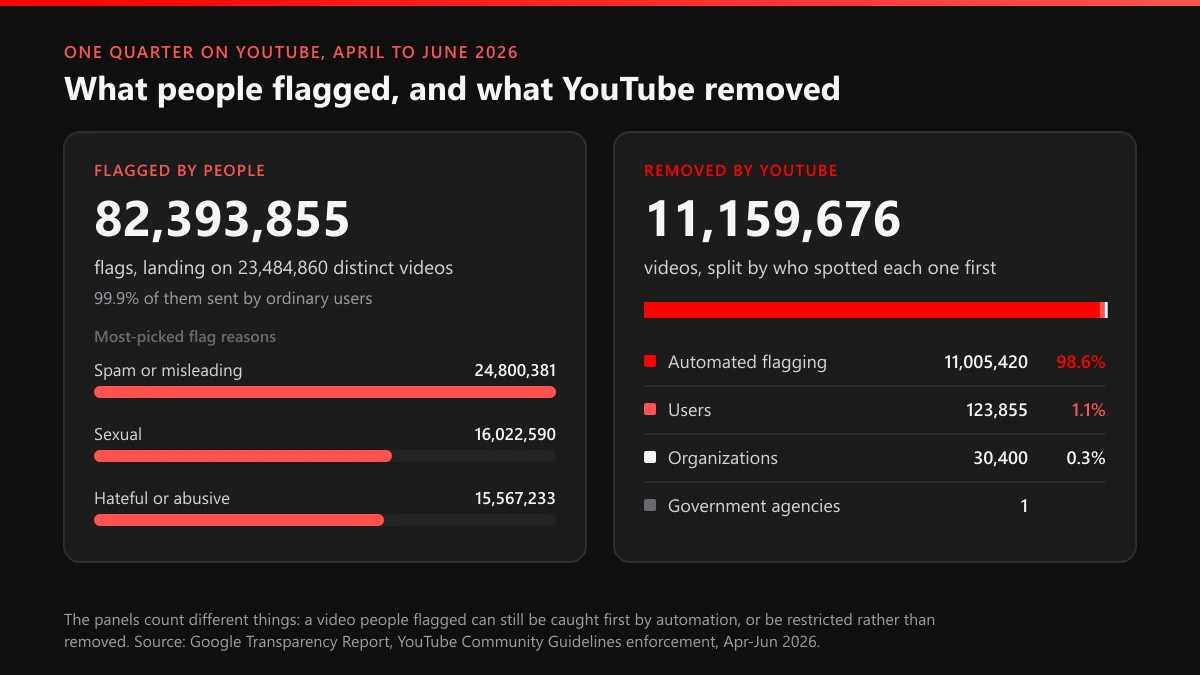
Those two figures measure different things, so don't divide one by the other and call the result a success rate. A flagged video can still be caught first by automation, restricted instead of removed, or wiped out along with a whole channel; terminations took down another 86,686,063 videos that quarter. What the split does show is where a person's report earns its keep. It matters on material a classifier can't judge without context: a threat that names someone, a scam link posted in reply to a creator, a clip whose problem only starts four minutes in.
Accuracy counts for more than persistence. YouTube reviews flags from its Priority Flagger members first, NGOs and government agencies trained on its policies, "because participants' flags have a higher action rate than the average user." Those flags are judged under the same rules as yours; their edge is precision.
Volume buys nothing. YouTube's transparency help says it runs systems that identify "suspicious or exceptionally high flagging volumes" and leaves flags outside those bounds out of its published data.
What happens when you report a YouTube video after you press Report?
Nothing comes down on the spot. YouTube's reporting help says plainly that "when content is reported, it's not automatically taken down"; the flag joins a queue that reviewers work "24 hours a day, 7 days a week," and a person decides what changes, if anything.
Your flag carries the reason you picked, plus an optional timestamp and a line of explanation. Reviewers don't stop at your reason, though: YouTube says they "evaluate flagged videos against all of our Community Guidelines and policies, regardless of why they were originally flagged," so a video reported as spam can still come down as harassment. The review has four possible endings:
- Left up. No violation found, and in YouTube's words "no amount of reporting will change that."
- Restricted. Usually an age restriction, which keeps the video up for adult viewers.
- Removed. According to YouTube's strike rules, "the first violation is typically only a warning." Strikes follow: a one-week freeze on uploads and posts, then two weeks, and three strikes inside the same 90 days can end the channel.
- Channel terminated. For three strikes, one case of severe abuse, or a channel "wholly dedicated to violating our guidelines," as spam channels often are; see what a terminated or deleted channel means.
The uploader hears about it; you mostly don't. "Creators are notified of the removal or restriction over email and on their Channel Settings," YouTube's transparency help explains, and each removal notice links to an appeal that a different reviewer handles. From April to June 2026 YouTube logged 1,269,277 appeals against video removals and reinstated 87,953 videos, per its appeals data, so even a report that worked can be reversed.
Reading your Reporting History
For videos, results live in one place: youtube.com/reporthistory, opened on a computer. Per the Reporting History help page, each flagged video shows one of three statuses, and a video flagged twice "will only show up when you most recently reported it."
| What you see | YouTube's definition | What it tells you |
|---|---|---|
| Live | "Either not yet reviewed or that we decided don't violate YouTube Community Guidelines" | Two different outcomes share one label, and the page never says which |
| Restricted | "Placed in a restricted state, like age-restriction" | Action was taken, and the video stays up for some viewers |
| Removed | "Removed from YouTube" | Gone; the uploader received the notice, without your name on it |
| Not in your list at all | "Many others have already flagged the video, and we're already reviewing the video based on those flags" | Your flag joined a review that was already running |
| "Information about this video isn't available" | "The creator removed the video, or the video isn't available on YouTube for other reasons" | No proof your report did anything; a country block shows the same text |
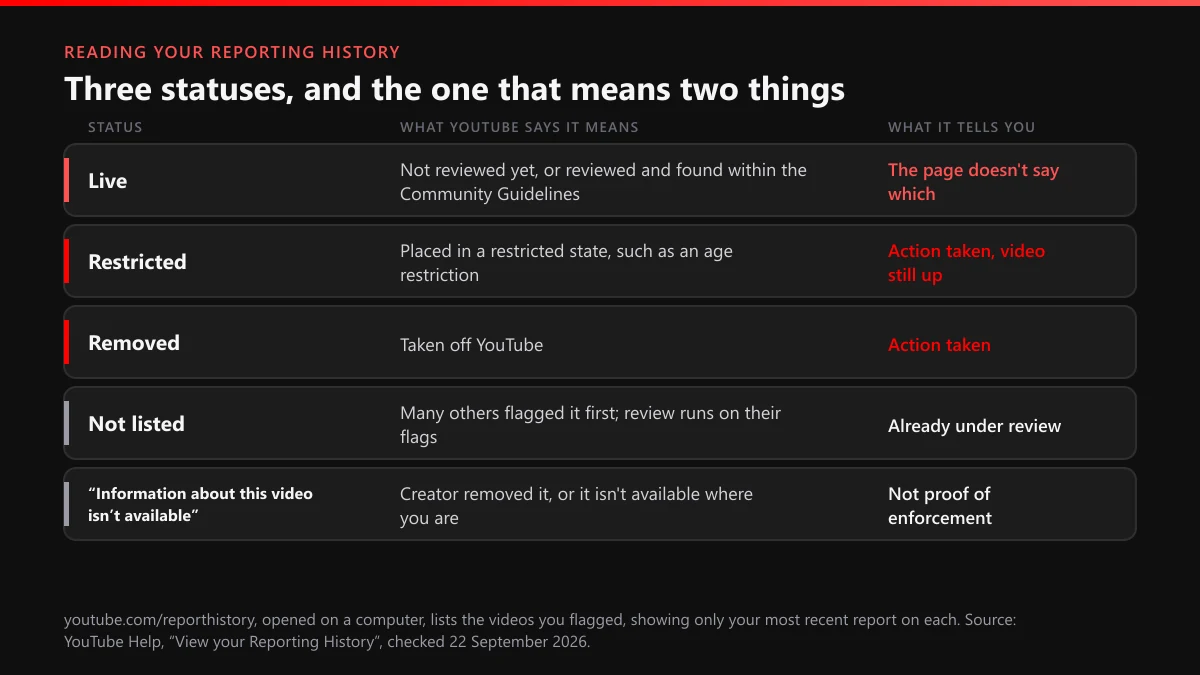
"Live" is where most "I reported it and nothing happened" complaints begin. It covers a video nobody has looked at yet and a video a reviewer looked at and cleared, and the page won't separate the two. Flagging again doesn't settle it, because the newer report simply replaces your older entry.
Does YouTube tell you who reported your video?
No. For the ordinary flag YouTube's answer is a single sentence: "Reporting content is anonymous, so other users can't tell who made the report." The uploader gets a notice about the content instead, by email and in Channel Settings, naming what was removed and which policy it broke. The name of whoever pressed Report is not part of it.
A first offence usually brings a warning, not a strike, and since 29 August 2023 creators can clear one with a short policy training that starts a 90-day expiry clock. For a first-time offender, a successful report can end with nothing more than a lesson on the rule they broke, and no hint of whose flag started it, or whether a flag did.
One claim circulates widely with no official backing: that creators get an alert the moment a video is flagged or "placed under review." YouTube's help pages describe notices that follow an action, whether a removal, a restriction, a warning or a strike, and none for a flag that led nowhere.
Anonymity covers the report, not its circumstances. Flag a reply aimed at you and the commenter only has to remember who they were arguing with; flag a message in a live chat of forty viewers and the list of suspects is short. Report what breaks a rule anyway, and leave the guessing to them.
Where your name does travel
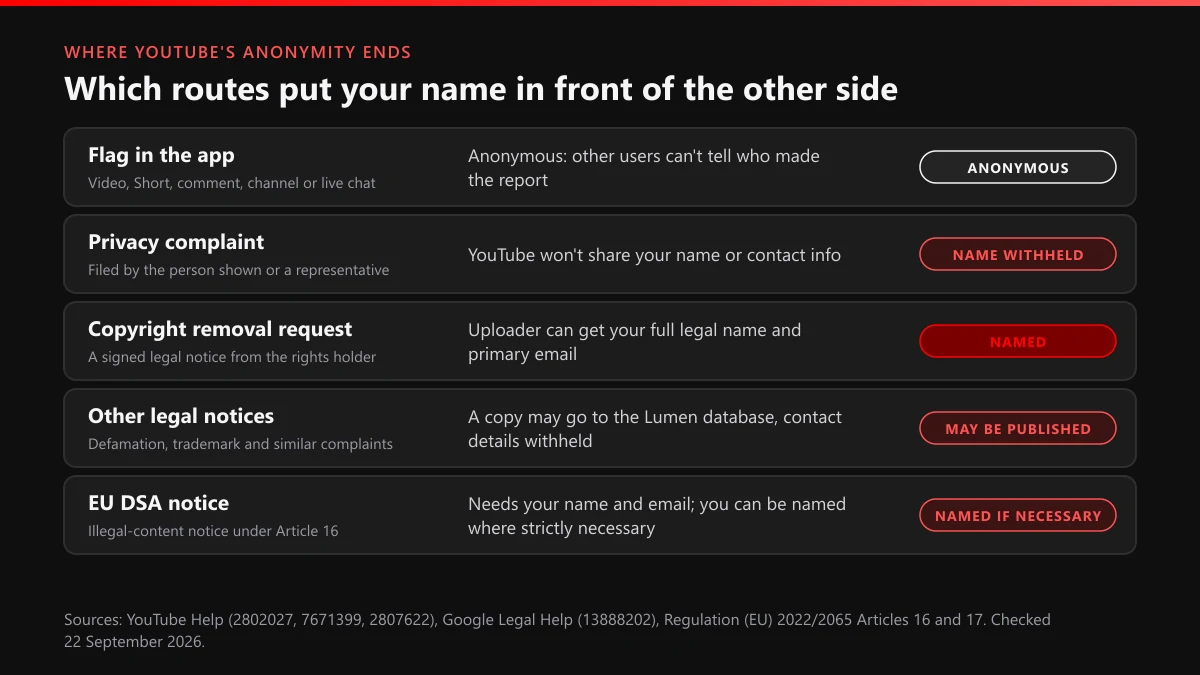
Formal notices are a different matter: most are signed, and each route handles your name its own way.
| Route | What you file | What the other side can learn about you |
|---|---|---|
| Report button on a video, Short, comment, channel or live chat | A reason, an optional timestamp and a note | Nothing: "other users can't tell who made the report" |
| Privacy complaint | A claim about your own image or personal information | Not your name or contact info, though the video itself usually shows who complained |
| Copyright removal request | A signed notice as the rights holder or their representative | Your full legal name, your primary email, the owner's name and your description of the work |
| Other legal complaints, such as defamation or trademark | A legal notice under the relevant law | Google may send a copy to the Lumen database, minus your personal contact information |
| EU Digital Services Act notice | An illegal-content notice with your name and email address | Your identity, in the uploader's statement of reasons, "where strictly necessary" |
The copyright row surprises people most: YouTube's copyright removal page keeps only your address and phone number confidential, "unless requested as part of a lawsuit." The YouTube copyright removal request walkthrough covers the form, and the YouTube copyright strike page covers what follows.
In the EU, the law also obliges YouTube to tell you its decision. Article 16 of the Digital Services Act builds a notice around "the name and email address of the individual or entity submitting the notice," child sexual abuse cases excepted, and requires the platform to "without undue delay, notify that individual or entity of its decision." Article 17(3)(b) lets the uploader's statement of reasons include, "where strictly necessary, the identity of the notifier." Google may also send legal notices to the Lumen project for publication, though "We do not share the submitter's personal contact information with Lumen."
How do you report a YouTube video, a Short or a live chat message?
Sign in, open the video's More menu, choose Report and pick the reason that matches what you saw. The one step worth slowing down for is the timestamp.
- Sign in to a Google account first. Signed out, the Report option only opens a prompt: "Need to report this? Sign in to report content that breaks our rules."
- On a computer, click More below the video, then Report. On a Short, More sits in the bottom-right corner. In the YouTube app, tap More, then Report.
- Pick the reason closest to the violation. Reviewers check every policy anyway, so a near miss won't sink a valid report.
- Add the timestamp where the problem starts, plus one sentence on who is targeted or what is being sold.
- Submit, then check youtube.com/reporthistory from a computer after a few days.
Live chat has its own control: tap the message, choose Report and pick a reason. The full guide on how to report a video on YouTube, Shorts and comments included has a reason-to-route table, and the page on reporting counterfeit goods and misinformation helps where the right reason is less obvious.
Reporting anonymously, or for privacy
You don't need a second account to report a YouTube video anonymously. The flag already hides you from the uploader, though not from YouTube, which sees the account that sent it.
How to report a YouTube video for privacy is a separate question. When the problem is your own face, name or address in someone else's upload, skip the flag and use YouTube's Privacy Complaint Process, which the person shown can file, or a parent, guardian or legal representative for them.
Can you report a video on YouTube without an account?
Not with the Report button. Signed out, YouTube asks you to sign in before it accepts a flag, and its reporting help offers no signed-out version of the same tool.
We checked on 22 September 2026 from a browser with no Google account signed in. From the video's Report option we got one prompt: "Need to report this? Sign in to report content that breaks our rules." The channel's About panel offered Share channel and nothing else, and the link to YouTube's impersonation form sent us back to the policy page. YouTube Ban Service runs that check before calling any route open, because help pages and the live interface drift apart.
Two routes don't depend on a YouTube sign-in at all:
- Copyright notices can go by email to [email protected], or by fax or mail, with every required element in the body of the message rather than in an attachment.
- Child sexual abuse material belongs with NCMEC's CyberTipline in the US, which takes reports from the public and lets you decide whether to share contact details, or with your national hotline and the police.
Everything else, from comment reports to impersonation, runs through a signed-in account.
Reporting a comment, and when you can delete other people's comments
Report a comment from the More icon next to it. Apart from YouTube itself, only two parties can delete one: the person who wrote it and the channel it sits on.
A reported comment gets the same review as a video. "If someone reports your comment and it violates our Community Guidelines, it gets removed," says YouTube's help page on removed comments, and the author may be told it was removed or that commenting is paused. Since December 2022, repeat abusers can get a 24-hour timeout, Engadget reported. People rarely start the process: of 1,551,576,962 comments removed from April to June 2026, humans flagged 2,230,906 first.
So how do you delete other people's comments on YouTube? Under your own videos, open the comment's menu, or the Comments page in YouTube Studio, and choose Remove. From there you can also Report spam or abuse, Hide user so that person's comments stop showing on your channel, or Approve comments held for review; moderators you appoint can use these tools too, with managing moderators getting more options than standard ones.
What if it's someone else's video?
Then the comment isn't yours to delete. How to delete someone else's comment on YouTube under a video you don't own has a short answer: you can't. Report it, or ask the creator, who can. On your own channel, hiding a user is the quieter fix for a repeat offender; the guide to banning someone from your own channel walks through it, and the page on reporting reuploads and comments covers the comment report in more depth.
A spam bot in the replies, and the reporting bot sold to you
The spam bot is the easy one: report the comment as spam and report the channel behind it. Pretending to be someone else in comments is itself a listed violation, since YouTube's impersonation policy names "posting comments that make people falsely think you are another person or entity." Spam like this makes up the bulk of what YouTube removes. From April to June 2026 it took down 1,310,221,998 comments and 2,310,181 channels for spam, deceptive practices and scams, 84.4% and 84.5% of each total.
The other kind of bot is the one sold to you: a "YouTube reporting bot" that fires flags from dozens of accounts at a channel you want gone. Volume is the one input YouTube says it doesn't act on. Its systems watch for abnormal flagging, and its Reporting History help concedes that when many people have already flagged a video, YouTube is "already reviewing the video based on those flags." A thousand more flags add a thousand duplicates. The same arithmetic holds on Instagram, where an Instagram mass report tool and a spam report bot hit the same wall.
How do you report a user on YouTube for impersonation?
Open the channel, click ...more in its description and choose Report user, or use YouTube's impersonation form, which the policy page links to directly. Either way you need to be signed in.
You don't have to be the person being copied. YouTube's impersonation policy invites a report whenever "yours or another creator's channel is being impersonated," and its examples are specific: putting "Real" or "Official" into a channel name, passing as a backup channel by adding "Backup," "Shorts," or "Live" to a creator's name, or using someone's AI-generated voice or likeness to suggest they own the channel. When YouTube agrees, "the channel may be removed to protect our community."
Attach the evidence, because a channel report is judged on the channel. YouTube says it doesn't review a reported channel's videos and relies on the ones you attach, so report the worst uploads separately too. If the copy uses your face or a cloned voice rather than your branding, the privacy route usually fits better; the page on hijacked channels, deepfakes and defamation covers those cases. If the account copies nobody but keeps targeting you, that is harassment, a different policy with its own report reason.
How do you report YouTube ads on PC or phone, scams included?
Click Sponsored, or the More or Info icon on the ad, and select Report ad. That works on a PC and in the phone app; reporting from the ad itself is "only available on YouTube mobile and computer," YouTube's ad-reporting page says, so an ad seen on a TV goes through Google's web form instead.
An ad report skips the Community Guidelines queue entirely. It lands with Google's ads team, which uses "a combination of human and automated review to ensure ads adhere to Google's ad policies," and the channel you were watching has nothing to do with it: the advertiser bought the slot, not the creator.
Does reporting an ad as inappropriate, or as a scam advert, change anything?
It can. "If you find an ad that's inappropriate or violates Google Ads policies, you can report it," YouTube says, and Google's 2025 Ads Safety Report, published on 16 April 2026, counts over 8.3 billion ads blocked or removed in 2025 and 24.9 million advertiser accounts suspended, "including 602 million ads and 4 million accounts associated with scams." Google says it acted on "more than four times as many user reports in 2025 than in the year prior." Report a YouTube advert that slipped through; the report reaches the team that can pull it.
With scam ads, screenshot the advertiser name first; the same ad may never reach you twice. If money has changed hands, tell your bank and the police too, because an ad report removes the ad, not the loss. The guide to reporting YouTube ads and scams covers the channels behind them.
How do you request a takedown on YouTube when a flag is the wrong tool?
File the legal notice that matches the harm, under your own name or through a representative. A takedown request is judged on legal grounds rather than YouTube's Community Guidelines, so it can reach content a flag can't, such as an upload whose only problem is that it copies your work.
The takedown procedure, route by route
- Name the legal basis: copyright in your work, privacy in your image or details, intimate imagery shared without consent, or a claim such as defamation or trademark.
- Use that route's own form: a copyright removal request in YouTube Studio or by email, the Privacy Complaint Process, YouTube's NCII form for US users, or the legal complaint forms.
- Expect your name to travel with it, in full on a copyright notice.
- Wait for the decision. YouTube publishes no general turnaround, but the US TAKE IT DOWN Act, which the FTC began enforcing on 19 May 2026, requires removal of intimate images "within 48 hours of a valid request."
- In copyright cases, watch for a counter notification: the claimant then has 10 US business days to show a court action or a Copyright Claims Board claim, or the video goes back up.
Takedown requests come in two sizes. For a single YouTube video takedown, start with the guide to getting a YouTube video taken down, or, when the upload is a copy of your own work, the copyright takedown for stolen videos. For a whole channel, the official channel takedown routes explain why only valid strikes remove one.
If your report went nowhere
Start with Reporting History, on a computer, and read "Live" for what it is: no review yet, or a review that found nothing. Flags from friends change nothing about the rules the video is measured against.
What changes an outcome is a different report, not a louder one. Your own face or address goes to the privacy form, and your own work goes to a copyright notice. A cloned channel goes to the impersonation form, with the copies attached. Each is stronger with timestamps and links a reviewer can check in a minute.
YouTube Ban Service does that sorting for people who would rather not guess. We read what the video or channel actually did, match it to the one official route that reaches it, and prepare the evidence before anything is filed; YouTube makes every final decision, and a channel that breaks no rule is one we decline. Browse the other reporting solutions, use our YouTube content removal service, or send us the link. Don't re-flag the same video while you wait; Reporting History will only overwrite your first entry.
FAQ
How long does YouTube take to review a report?
YouTube publishes no timeframe. Reviews run 24 hours a day, 7 days a week, and Reporting History shows Live until something changes. The "24 to 48 hours" figure in third-party guides has no official source; the only hard 48-hour clock nearby is the US deadline for removing reported intimate images.
Will someone know I reported their comment?
Not from YouTube. A comment report is as anonymous as a video report. If the comment comes down, its author may be told it was removed or that commenting is paused, and repeat offenders can get a 24-hour timeout. Nothing names you, though a reply aimed at you makes you an easy guess.
Does reporting a video again, or from several accounts, help?
No. Reporting History keeps only your latest report on each video, and when a video already carries many flags YouTube says it is already reviewing the video based on those flags. Extra flags add duplicates, not weight.
Can I cancel a report I sent by mistake?
YouTube documents no way to withdraw a flag. A mistaken report is reviewed like any other; if the video breaks no rule, it stays up and nothing lands on the uploader's channel. YouTube's abuse checks target suspicious or unusually high flagging volumes, not one wrong tap.
Is a privacy complaint on YouTube anonymous?
Partly. YouTube's privacy guidelines promise: "We won't share your name or contact info with the person who posted the content." But the complaint must come from someone identifiable in the upload, or a parent, guardian or legal representative, so the uploader can often guess who filed it.
Do Priority Flaggers get videos removed faster?
Reviewed faster, judged the same. YouTube looks at Priority Flagger reports first because their flags have a higher action rate than the average user, but the same policies apply. The program is for NGOs and government agencies, so don't expect an invitation as an individual.