27 September 2026 · YouTube Ban Service · ~16 min read
Google YouTube account recovery, by account type
Google YouTube account recovery happens at accounts.google.com, because YouTube has no password of its own. Enter the Gmail address or phone number you sign in with, answer Google's questions from a device you've used before, then set a new password. If the channel sits on a Brand Account, recover the owner's login instead.
Where does YouTube send you when the password stops working?
To Google, every time. YouTube's sign-in help puts it in one sentence: "You sign in to YouTube with your Google Account, so your YouTube password is the same as your Google Account password." There is no YouTube reset form, and nothing inside youtube.com can change that password for you.
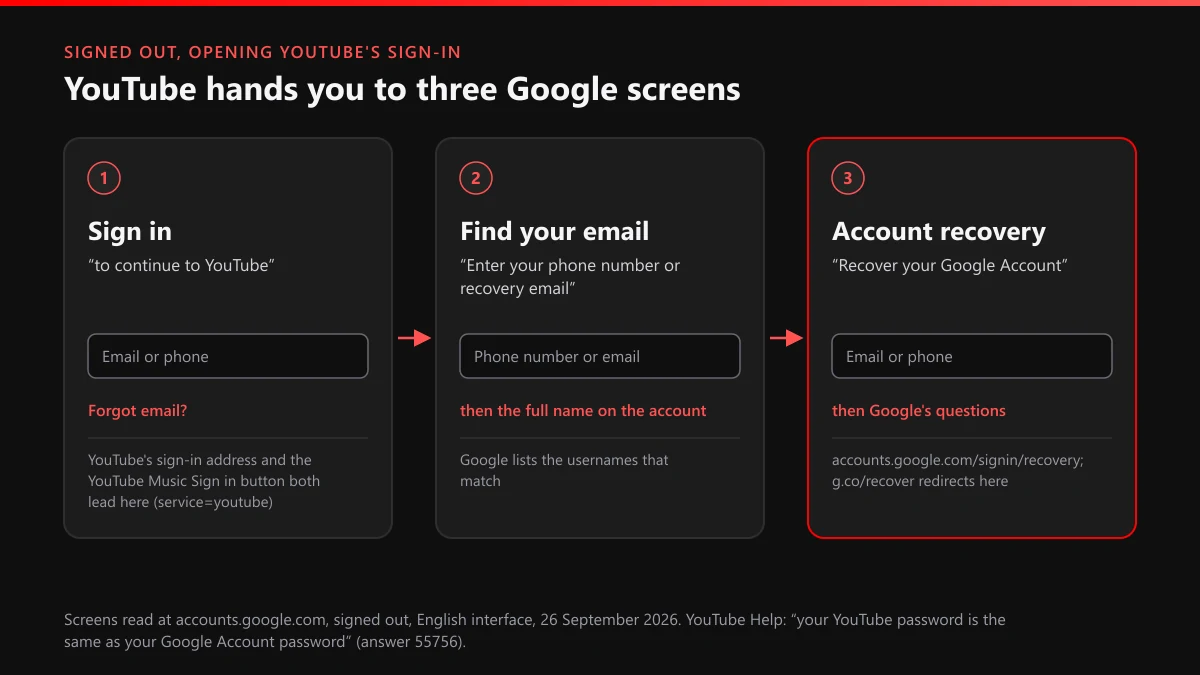
When we opened YouTube's sign-in address on 26 September 2026, signed out, we saw it hand straight over to accounts.google.com without showing a single YouTube page. The screen said "Sign in" with "to continue to YouTube" beneath it, one box for an email or phone number, and a Forgot email? link. Then we opened YouTube Music and read the address behind its own Sign in button. Same Google page, same service=youtube tag in the URL, with a music layout flag added. Two apps, one account.
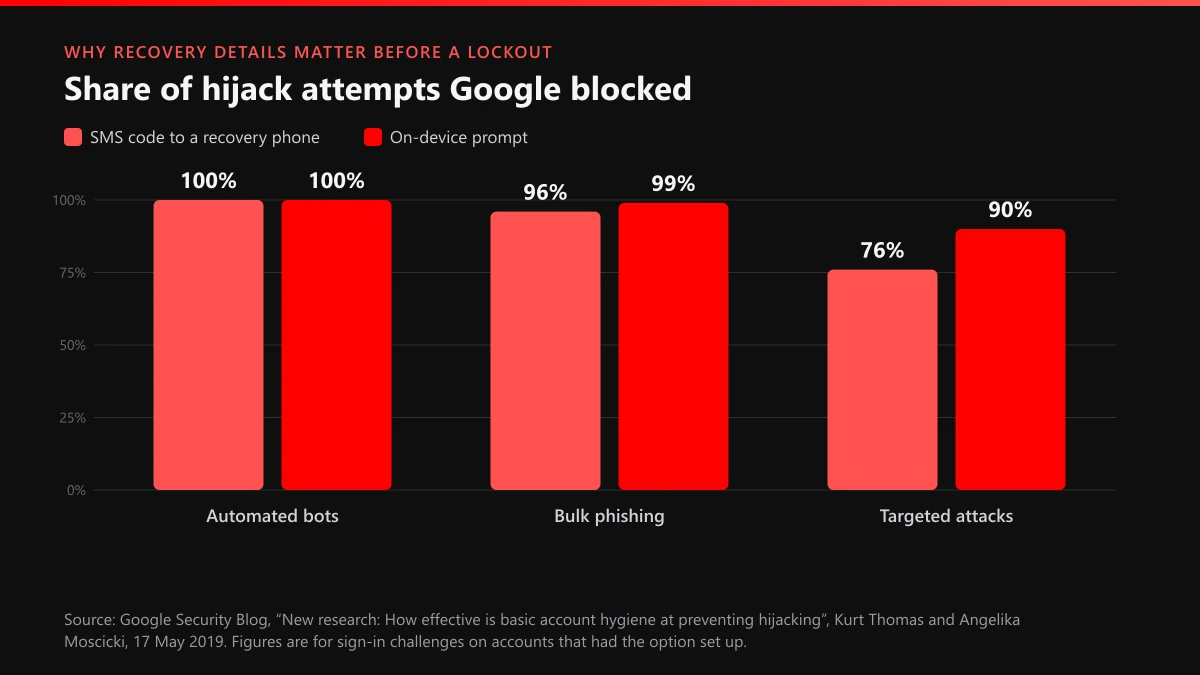
That makes recovery a matching test, and what you set up years ago counts for more than anything you type today. Google compares your answers, the device and browser you're using, and the recovery phone or email already stored on the account. The same details keep intruders out. In figures Google published in May 2019, an SMS code sent to a recovery phone blocked 100% of automated bots, 96% of bulk phishing attacks and 76% of targeted attacks, according to Google's security blog. An account with no recovery phone gives up that protection, and it gives up the easiest way back in.
Wrong answers cost nothing but time. Google's recovery help says guesses "won't kick you out" and "there's no limit to the number of times you can attempt to recover your account."
YouTube sign in to my account recovery: three screens, one address
Every search along the lines of "youtube sign in to my account recovery" ends on the same three Google screens. This is how they read on 26 September 2026, in English:
- The Sign in screen reads "to continue to YouTube" and holds the email-or-phone box, with Forgot email? underneath.
- Find your email asks you to "Enter your phone number or recovery email," then wants the full name on the account and lists the usernames that match.
- Account recovery, headed "Recover your Google Account," starts Google's questions at accounts.google.com/signin/recovery. The short link g.co/recover redirects to the same page.
Type that last address yourself. A search for recovery help is exactly where fake support pages and paid "unlock" offers sit waiting.
Which Google Account is the channel really on?
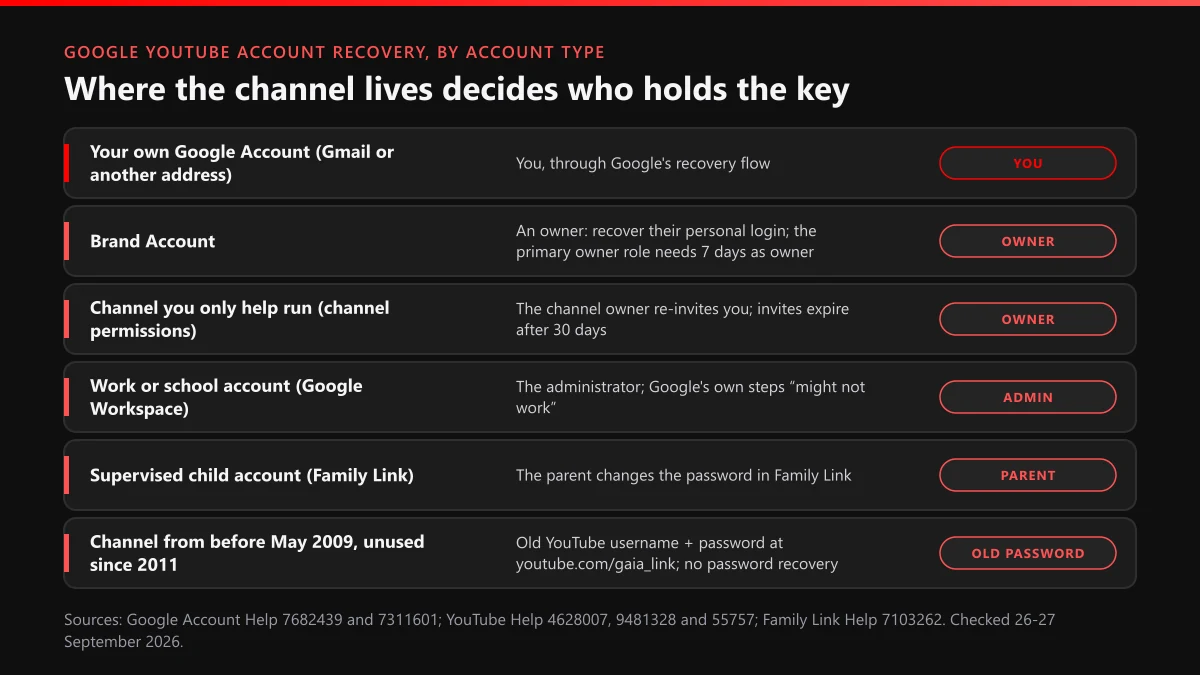
Work that out before anything else, because it decides who is allowed to recover it. A channel can sit on your own Google Account, on a Brand Account with several owners, on a work or school account that an administrator controls, or on a child account a parent supervises. Each has a different key-holder. Recovering the wrong account works perfectly and changes nothing.
| Where the channel lives | How to tell | Who can get it back | Start here |
|---|---|---|---|
| Your own Google Account on a Gmail address | The channel opens under your own profile picture | You | accounts.google.com/signin/recovery |
| Your own Google Account on another address (Outlook, Yahoo, your own domain) | You never had a Gmail inbox for it | You, if you can still read that inbox | The same Google flow; recover the outside mailbox first if it's gone too |
| Brand Account | Listed under "Your Brand Accounts" at myaccount.google.com/brandaccounts | An owner; only one of 7+ days can become primary owner | That owner's personal Google Account |
| Someone else's channel you help run | You were invited through channel permissions in YouTube Studio | The channel owner | Ask for a fresh invite; invites expire after 30 days |
| Work or school account | The address ends in a company or school domain | The administrator | Your IT desk or school admin |
| Supervised child account | A parent approves settings in Family Link | The parent | Family Link: Controls, then Account settings, then Change password |
| Channel created before May 2009, unused since 2011 | You remember a YouTube username, not an email | Whoever knows the old YouTube password | youtube.com/gaia_link |
Not sure which row is yours? Start with old inboxes. The address that received YouTube's comment, upload and copyright emails over the years is usually the one the channel was signed in with, so search every mailbox you still own for mail from YouTube before you guess. Then sign in to each Google Account you can reach and open myaccount.google.com/brandaccounts, as YouTube's Brand Account check suggests. A channel listed under "Your Brand Accounts" is run from that login, even if it never appears on the main profile. Write down which account holds which channel while you're at it; people with three or four old Gmail addresses lose hours recovering the wrong one first.
School accounts need a warning of their own. Google's recovery help says its steps "might not work" for an account "through your work, school, or other group" and sends those users to the administrator. YouTube's school account rules go further: since 1 September 2021, once an administrator marks a student as under 18, "your YouTube channel will no longer be tied to your school account." Those students get 60 days to download their data with Google Takeout, and only on accounts created after September 2021 where the school has Takeout switched on. In practice, a channel built on a school address belongs to the school.
Brand Account channels: the owner's login is the key
A Brand Account has no password to reset. YouTube says you "don't need a separate username or password to manage YouTube channels with a Brand Account," so there is nothing separate to recover. Get back into an owner's personal Google Account and the channel reappears in that account's switcher.
Three rules in YouTube's primary owner help shape what follows. Only someone who has been an owner "for 7 days or more" can take the primary owner role. Managers get no say: they "will not have the option to change the primary owner role." The third rule is the one that ends channels: "If you delete the primary owner account linked to your channel, the channel will also be deleted." So an old personal account that still holds the primary role isn't clutter. Move the role before you close it.
The same seven-day clock runs against an intruder who was added as an owner rather than one who logged in as you. Google's Brand Account roles page says "you have to be an owner of the account for 7 days before you can remove managers or owners." A stranger who shows up in the owner list can't strip you out in their first week, and you can remove them the moment you spot them.
How to recover a Gmail account YouTube uses, step by step
Run Google's flow from the device and place Google already knows you by. Its tips for completing recovery put that first: a computer, phone or tablet "where you frequently sign in," the browser you normally use, and a location such as home or work. Then go through it in this order:
- Open accounts.google.com/signin/recovery on that device and enter the Gmail address or the phone number on the account.
- If you don't know the address, choose Forgot email?, give the recovery phone or recovery email plus the full name on the account, and pick your username from the list Google shows.
- Answer every question Google asks, guessing rather than skipping. For the last password you remember, give the most recent one, even if it's years old.
- Take a code on the recovery phone or recovery email whenever Google offers one. If a route is dead, choose another option on the same screen instead of starting over.
- When Google asks for a contact address, give an inbox you can read right now, then watch it and its spam folder for an email titled "Your Google support inquiry."
- Set a new password when prompted, one you have never used on this account.
- Open YouTube, click your profile picture and check the account switcher. A channel on a Brand Account shows up there, not on the main profile.
What happens next depends on how risky the request looks. Google's security hold page says recovery requests "can be delayed for a few hours or a number of days, depending on a variety of risk factors," and for longer on accounts with 2-Step Verification. If you changed the recovery phone or email recently, the recovery help adds that the change "may take up to 7 days" to count. Try again in a few days rather than hammering the form from new devices, since each unfamiliar device is one more signal that something is off.
Not every Google Account behind a channel is a Gmail account. If yours was made with an Outlook, Yahoo or company address, the codes and Google's inquiry email go to that outside provider. Recover that mailbox through its own provider first. Google can't send you anything you can't open.
One outcome catches people off guard: the password works, and YouTube shows a termination notice where the channel used to be. Recovery is over at that point and the problem has changed. That's an appeal, and the walkthrough for unbanning a terminated channel covers it.
Why no one can recover a YouTube account without Google
There's nothing outside Google to recover. The password is the Google password, the channel is a feature of a Google Account, and the only reset is the one on accounts.google.com. People who ask how to recover a YouTube account without Google usually mean one of four things, and none of them opens a side door:
- A phone call. Google's recovery help rules it out: "For your security, you can't call Google for help to sign into your account."
- YouTube's own support. Eligible creators, such as those in the YouTube Partner Program, can reach Creator Support, but YouTube's cleanup guide offers it only once "you've already recovered your Google Account." @TeamYouTube on X can point you to forms. It can't reset anything.
- The old YouTube username. Channels created before May 2009 and not signed in to since 2011 were connected to Brand Accounts automatically. You claim one at youtube.com/gaia_link with the old username and password, and YouTube's legacy channel help is blunt about the rest: "there is no password recovery option for these accounts."
- A deleted account. Google says a deleted account "may still be recoverable" if you change your mind soon, and one deleted "a while ago" may not be. It gives no day count. A channel lost this way is gone in a different sense from a terminated one, and the terminated vs deleted explainer sets out which of the two can come back.
Anyone offering a route that skips Google wants something in return. Usually it's your login "to work on the case," which hands a stranger the same access a hijacker would steal. Our teardown of what YouTube ban-service sellers actually deliver shows whose Google Account ends up at risk in that trade. And if it's the old name you miss rather than the login, getting an old YouTube username back explains what YouTube will and won't release.
YouTube Music account recovery: what comes back, and who bills you
Your YouTube Music library comes back with the Google Account, because it never lived anywhere else. Playlists, likes and uploaded songs belong to whichever account signs in, and the Music app signs in through the same Google page as YouTube. YouTube Music's upload terms say your Stored Music Content "will only be accessible by you through your YouTube Music account," so nobody can hand those files over by another route. The upload library holds up to 100,000 songs, and every one of them waits behind the same password.
The paid membership is where things split. Who controls Premium or Music Premium while you're locked out depends on where you joined:
| How you joined | Who controls it while you're locked out | What to do |
|---|---|---|
| In the YouTube or YouTube Music app on an iPhone or iPad | Apple | Cancel or change it from your Apple account; YouTube can't refund Apple billing |
| On the web or in the Android app, billed by Google | The Google Account itself | Recover the account first; the membership is managed from inside it |
| Invited to a family plan | The family manager | Ask the manager, the only person who makes membership decisions |
| Through a channel on a Brand Account | The channel's owner | Managers get no Premium benefits for a channel they don't own |
For iPhone sign-ups, YouTube's membership help says "you can cancel your paid membership from your Apple account," the one lever you still hold without the Google login. Family plans move slowly. The family plan rules cap a group at the manager plus 5 others and allow a switch of family group once every 12 months, so a member who recovers an account can't just hop to a new group. A deleted account is worse than a locked one here: Google warns you'll "lose access to subscriptions and content you bought with that account on YouTube or Google Play."
Back in, but the channel isn't yours anymore?
Then someone else had the account, and the login was only half the job. YouTube's hacked channel help starts from the account, not the channel: "When a YouTube channel is hacked, it means that at least one of the Google Accounts associated with the channel is also compromised." Nothing on the channel side moves until that account is yours again. YouTube supports only hacking incidents from the past 9 months, citing its data retention policy, so a takeover noticed late is already on a clock. Its hacked channel assistant, a chat tool TeamYouTube announced on 21 August 2024, now answers in English, Spanish and Portuguese.
Most takeovers follow one script, and Google has described it at scale. Its Threat Analysis Group tracked a campaign that, since late 2019, lured creators with fake collaboration offers, typically a demo of antivirus software, a VPN or a game, and planted malware that stole browser cookies. The hijacked channels were sold, or "rebranded for cryptocurrency scam live-streaming," with name, picture and content swapped to pose as tech or crypto firms. In its October 2021 report, Google said it had blocked 1.6 million messages to targets, restored about 4,000 accounts and cut related phishing email in Gmail by 99.6% since May 2021. A stolen session cookie skips the password entirely, so changing the password is not enough on its own. Sign out of every session you don't recognise as well.
Then clean up. YouTube Studio has a cleanup tool that "shows a list of unusual activities on your channel so you can review them all at once," per the cleanup guide, and both owners and managers can use it. Without it, go through the channel by hand:
- Uploads the intruder posted or made public. Delete them, then check YouTube Studio for strikes; a pirated film streamed from your channel can leave a YouTube copyright strike behind long after the intruder has gone.
- Channel permissions and Brand Account owners: remove everyone you don't know.
- Name, handle, picture and banner. Put them back, and expect that a handle released during the takeover may already belong to someone else.
- The Google Account itself: recovery phone, recovery email and third-party apps with access.
If the channel was terminated during the takeover, hold the appeal. YouTube says an appeal "may not be accepted if the account recovery is incomplete," so recover, clean up, and only then appeal. The guide to reporting a hijacked channel lists the reports that run alongside all this.
When your videos and your face turn up on another channel
Intruders often download a channel's library before wiping it, then re-upload the videos on channels of their own. That's a copyright matter, and it's yours to raise as the owner. The takedown guide for stolen YouTube videos sets the order, filing a copyright removal request covers the form itself, and getting a single video taken down handles the one upload that can't wait.
A clone is a different animal. It copies your name, avatar and banner, sometimes while you're still locked out, and runs the same giveaway stream at your audience. A channel report looks at exactly those parts, and what a YouTube channel report reviews explains which option to pick. A clone trading on a registered brand name also opens a trademark and counterfeit complaint, while taking down a whole copycat channel strings the routes together.
Who is offering to recover it for you?
Nobody Google works with. Its recovery help says it directly: "We don't work with any service that claims to provide account or password support." No outside service has a line into Google's recovery team. Some can help you prepare answers for the form; none can skip it. Anyone who asks for your password, a sign-in code or remote access to your computer is attempting a second takeover.
The offers turn up wherever locked-out creators post. Replies under an "I got hacked" video, DMs from accounts with "recovery" in the handle, and paid ads promising to unlock Google accounts are the usual spots, and each has its own report route. Scam comments and replies go through the steps for reporting YouTube comments and reuploads. Ads go through reporting YouTube scam ads, and a video selling "recovery" through the normal video report flow. Flags are anonymous, and what happens after you flag a video covers what a reviewer does with one. On your own channel, hiding a user from your channel keeps the same accounts out of your comments while you rebuild.
The same sellers often sell the reverse too: mass-report packages aimed at someone else's channel. Those don't work the way they're marketed, as the YouTube mass report bot breakdown shows, and the pattern repeats on Instagram in our look at Instagram mass report tools and the note on spam report bots for Instagram accounts. A channel that really breaks the rules comes down through one precise report, the method laid out in getting a rule-breaking channel banned.
YouTube Ban Service doesn't recover Google Accounts and never touches a client's login. It reports the copycat channels, scam comments and fake-support uploads that gather around a locked-out creator, using YouTube's own reporting, impersonation and copyright routes, and YouTube makes every decision on them. A lookalike that breaks no rule, such as a fan page that says what it is, is one we leave alone.
What should you set up before the next lockout?
Recovery options, while you can still reach the account. In Google's 2019 study, on-device prompts stopped 90% of targeted attacks and an SMS code to a recovery phone stopped 76%, and both only helped accounts that had them set up beforehand.
Google has added more ways back in since then. Recovery contacts arrived on 15 October 2025, and Google's announcement describes the mechanism: during a recovery "you will share a code with them," and they confirm it on their own device. The recovery contacts help sets the limits. You can add up to 10. Each has up to 7 days to accept, then there's another 7-day wait before they can help, and the numbers they're shown expire in 15 minutes. Workspace accounts, Advanced Protection accounts and child accounts can't use the feature at all.
On Android, Sign in with Mobile Number finds your accounts from the phone number and asks for your previous device's lock-screen passcode, provided you were signed in on that device within the past 14 days. Google also announced a selfie-video sign-in on 23 July 2026, set up at g.co/signin-selfie, where a later selfie gets you back in if you're stuck. YouTube's own cleanup guide closes by recommending 2-Step Verification with a passkey and current recovery options.
Do it tonight, in this order. Add a recovery phone and a second recovery email you actually read. Add two recovery contacts you can reach by phone within minutes, because their numbers expire in 15. If the channel sits on a Brand Account, make a trusted second person an owner now, as YouTube's own help recommends; the seven-day clock only starts on the day they accept. And if a clone is already live while you're locked out, send its link to the case team through the contact page. The full list of YouTube guides and the YouTube content removal service cover whatever else the takeover left behind.
FAQ
Does YouTube Gmail account recovery also bring back my inbox?
Yes. The Gmail inbox, the YouTube channel, YouTube Music and anything bought on Google Play all sit on one Google Account with one password. Recovering that account restores all of them together. It is also why a hijacker who takes the Gmail takes the channel with it.
How long does Google take to review a recovery request?
There is no fixed time. Google's security hold page says requests "can be delayed for a few hours or a number of days, depending on a variety of risk factors," and longer where 2-Step Verification is on. Recovery details you changed recently can take up to 7 days to count.
Can I call Google or YouTube to get my account back?
No. Google's recovery help says "you can't call Google for help to sign into your account," and that it doesn't work with any service claiming to offer account or password support. YouTube Creator Support, for eligible creators, steps in only after the Google Account is back.
Will Google delete my inactive account and my videos?
Google may delete a personal account that hasn't been used or signed into for 2 years, with deletions starting no earlier than December 2023. Its May 2023 announcement adds: "we do not have plans to delete accounts with YouTube videos at this time." Watching a YouTube video while signed in counts as activity.
What happens to my channel if the Google Account is deleted?
The channel goes with it. Google says a recently deleted account may still be recoverable but gives no day count. On a Brand Account the risk is sharper: deleting the primary owner's account deletes the channel, so move the primary owner role before closing any old account.
Can a recovery contact get into my YouTube account?
No. Google says a recovery contact "will not have access to your account or any of your personal information." They only confirm a short code you share during recovery, the numbers expire in 15 minutes, and a contact can help only after a 7-day wait from accepting.
I made my channel on a school account. Can I keep it after I leave?
Only with the administrator's help, because the school controls that account. Before the address closes, ask whether Google Takeout is switched on and download your videos. Since 1 September 2021, a school account marked as under 18 can't keep a channel tied to it at all.