1 October 2026 · YouTube Ban Service · ~13 min read
YouTube account recovery without email: work from what you still hold
YouTube account recovery without email starts on the sign-in screen, because its box takes the phone number on the account as well as an address. If you've forgotten the address, Forgot email? looks it up from a recovery phone or recovery email plus your full name. With neither, Google can't search for you, so the address has to turn up first.
What can you still sign in with when the email is gone?
More than most people expect, but each thing you still hold opens a different door. Google never searches by channel name, so the useful question isn't "where is my email?" but "what does Google already have on file that I can still reach?" A phone number, a second inbox, an old phone that never signed out, a sheet of codes in a drawer: any one of them can carry you to the password screen. Work down the list before you touch any form.
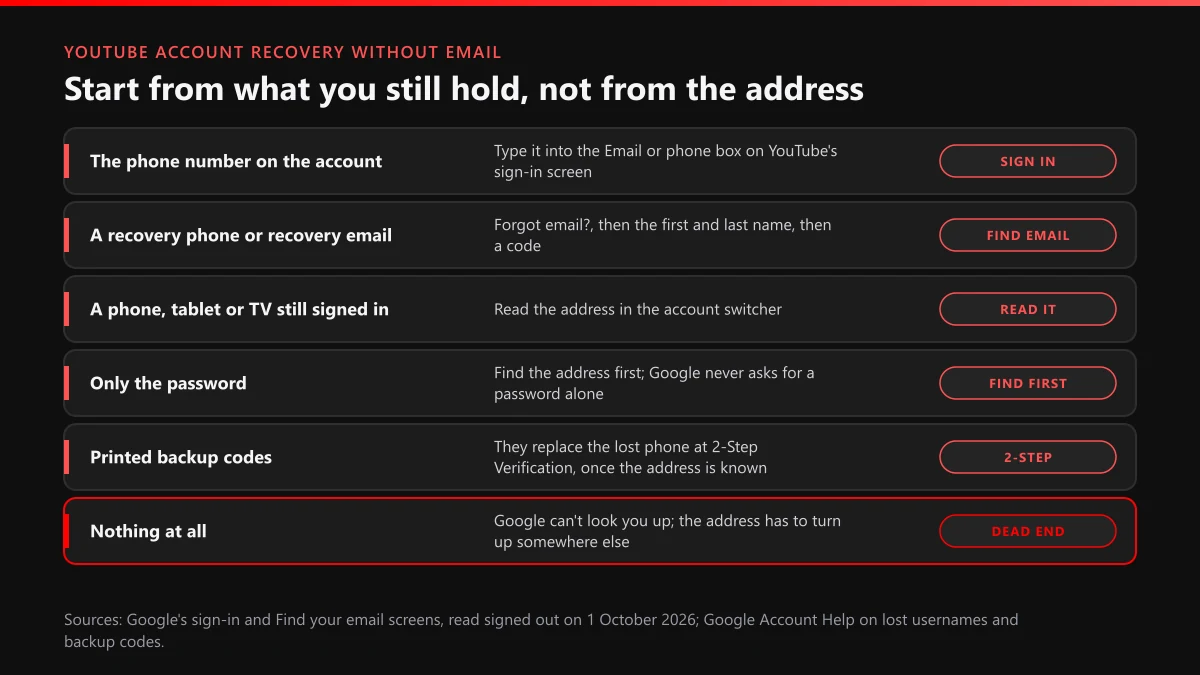
| What you still have | Where it goes | What happens next |
|---|---|---|
| The phone number linked to the account | Straight into the Email or phone box on YouTube's sign-in | Google treats it as the username and moves on to the password or a prompt |
| A recovery phone or recovery email | Forgot email? under that same box | Google asks for your first and last name, sends a code, then lists matching accounts |
| A phone, tablet or smart TV still signed in to YouTube | The account switcher behind your profile picture | The address is printed there; write it down before anything signs you out |
| Only the password | Nowhere yet | The password box appears only after an address or number; find that first |
| Printed backup codes | The 2-Step Verification screen, after the address | Each 8-digit code works once and replaces the lost phone |
| A Brand Account co-owner | That person's Brand Account settings | They can invite a new Google Account of yours as an owner |
| Nothing at all | Old inboxes, old devices, saved passwords | Google won't look you up; the address has to surface somewhere else |
The first row is the one people skip. YouTube's sign-in screen labels its only box "Email or phone," which means a youtube account recovery without email often isn't a recovery at all: you type the number, Google recognises the account, and you sign in as usual. The last row is the hard one, and the rest of this page is mostly about getting out of it. If you know the address and only the password has gone, skip ahead to the password section; if the account sits under a school or company domain, recovery belongs to its administrator, and our guide to how recovery differs by type of Google Account explains who that is.
How do you recover a YouTube account if you forgot the email?
Ask Google first, then go looking in your own things. How to recover a YouTube account if you forgot the email comes down to whether Google can contact you somewhere it already trusts. Google's recovery help spells out what its lookup needs: "A phone number or the recovery email address for the account" and "The full name on your account." With those two pieces the process is short:
- Open YouTube, choose Sign in, and pick Forgot email? under the Email or phone box.
- Enter the recovery phone number or the recovery email you think the account used.
- Type the first and last name on the Google Account, spelled the way you set it up.
- Enter the code Google sends to that phone or inbox.
- Choose your account from the list of usernames Google shows, then sign in with it.
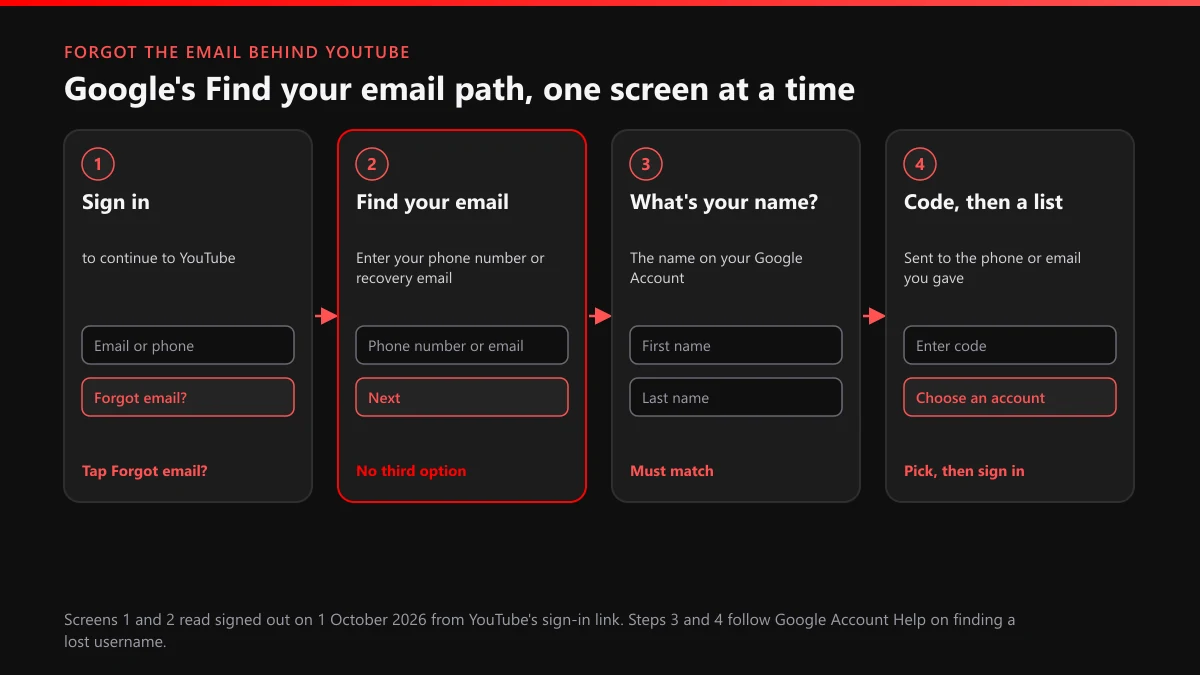
The name step trips people more than the code. A channel called "MaxPlaysGames" may sit on an account named after a parent, a school project or a nickname you used at fourteen. Try the names you plausibly used, one at a time. Google's recovery help also says there's "no limit to the number of times you can attempt to recover your account," so a wrong name costs a retry, not a lockout. Do it from the phone or laptop you used YouTube on most, because Google's tips ask you to "use a computer, phone, or tablet where you frequently sign in."
What Google's Find your email screen showed us on 1 October 2026
We opened YouTube's sign-in link on 1 October 2026, signed out, in a browser that had never used the account. Google moved us to a longer address ending in signin/identifier and showed "to continue to YouTube," one box labelled Email or phone, and Forgot email? beneath it. That link points to a page at signin/v2/usernamerecovery, and we opened it the same morning. What we saw was a title reading "Find your email," and the instruction under it read "Enter your phone number or recovery email." One field, one Next button, nothing else. No "I don't have either" link, no box for a channel name, no way to paste a YouTube handle. That's the honest shape of the problem: Google looks you up by what's attached to the account, and a channel isn't one of those things.
If Google can't contact you, the address is usually sitting somewhere you control. Check these before you give up on it:
- A device that never signed out. The YouTube app on an old phone, a tablet or a smart TV shows the account in its switcher. Don't sign out of it while you're looking.
- Saved passwords. Chrome, Safari's Keychain, Firefox or a password manager often store the youtube.com or accounts.google.com login with the address beside it.
- Other inboxes. Search every inbox you own for mail from YouTube or Google, such as security alerts, upload notices or comment emails. The "to" line is the address you need.
- Receipts. A Google Play, YouTube Premium or Super Chat receipt is mailed to the account that paid, so its "to" line gives the address away.
- People with channel access. Someone you once gave channel access may remember which address their invitation came from, and a manager can see the people listed on the channel's permissions page.
Can you get back in without the phone number on the account?
Yes, if Google has another way to reach you. YouTube account recovery without phone number access depends on the second channel you set up, or didn't, before the phone went: a recovery email, a signed-in device, printed codes or a trusted person. When Google sends a code to a number you no longer have, Google's tips for account recovery say to "select Try another way to skip this challenge," and the next screen offers whatever else is on file. Here is what can stand in for the phone:
| Stand-in | What it needs | Its limit |
|---|---|---|
| Recovery email | An inbox you can still open | A dead Hotmail or Yahoo inbox has to be recovered with its own provider first |
| Prompt on a signed-in phone | Any phone or tablet still signed in | Tapping Yes approves the sign-in; a wiped phone can't do it |
| Backup codes | A set printed or saved before the lockout | 10 codes per set, 8 digits each, every code good once |
| Recovery contacts | Someone you named earlier who has a Google Account | Up to 10 people; not offered on Workspace, child or Advanced Protection accounts |
| New Android phone | Your number plus your old phone's screen lock | Android only, and the old phone must have been signed in within 14 days |
| Selfie video | A video recorded while you still had access | Can't be added after the lockout; not every region or account gets it |
Backup codes are the quiet winner here. Google's backup codes help says you "can get a new set of 10 backup codes whenever you want," that you enter "one of your 8-digit backup codes" at the second step, and that a new set switches the old one off. Recovery contacts are the newer option: Google's recovery contacts page says "You can have up to 10 recovery contacts for your account," and the person only confirms a code on their own device. Neither helps unless you set it up beforehand.
One warning for people who lose a SIM and react quickly. Google says that if you change your recovery info, "it may take up to 7 days for those changes to take effect." A brand-new number added from a half-working session won't rescue a recovery the same afternoon. If your carrier can move the old number to a new SIM, that's usually faster than any form.
Is there a YouTube account recovery phone number you can call?
No, and the phrase means two different things. People typing "youtube account recovery phone number" into a search bar want either a support line to call or help with the recovery phone saved on their own account. The first doesn't exist. Google's recovery help says so in one line: "For your security, you can't call Google for help to sign into your account." YouTube's channel support for creators in the Partner Program starts only after the Google Account is back, so it can't fill the gap either.
That leaves a market for fake numbers. Search ads, reply comments and "support" channels list phone numbers for YouTube recovery, and the person who answers wants the same codes a hijacker would. Google's help adds: "We don't work with any service that claims to provide account or password support." Treat any number that isn't your own as a scam, and read what paid recovery sellers charge and deliver before you pay one.
The second meaning is the useful one. The recovery phone on your account is the single detail that turns most lockouts into a one-minute code. Once you're back in, open your Google Account's security settings and confirm the number is current, then add a second route. In Google's May 2019 study, an SMS code to a recovery phone blocked 96% of bulk phishing attempts and 76% of targeted attacks, and an on-device prompt did better still.
How does YouTube account password recovery go when you still know the address?
Faster than any other case on this page, because the address is the part Google can't guess for you. YouTube account password recovery is Google's ordinary password reset: enter the address on YouTube's sign-in, choose Forgot password? and answer what Google asks. Expect some mix of these, in roughly this order:
- The most recent password you remember. Google's tips ask for "the most recent one you recall"; an old one still counts as evidence.
- A code sent to the recovery phone or recovery email on file.
- A prompt on a phone or tablet that's still signed in, where you tap Yes.
- Try another way, which moves to the next method Google has for you.
- A contact email where Google can write to you if it needs time to check.
Give that contact email some thought. Google uses it to send the result, so pick an inbox you check every day and watch its spam folder. If the password reset works but YouTube then shows a channel you don't recognise or none at all, you may be in a different Google Account than the one that owns the channel; the symptom-by-symptom recovery guide covers that and the other screens you might land on. If the reset worked because someone else changed the password first, you're dealing with a takeover, and the cleanup comes next.
How do you recover a YouTube channel without email and password?
By working around Google's form, because with neither one the form has nothing to start from. Anyone asking how to recover YouTube account without email or password is asking Google to identify an account from nothing, and its lookup doesn't work that way. The same is true for anyone working out how to recover YouTube channel without email and password: the channel lives on a Google Account, and YouTube's hacked channel help says every channel is "associated with at least one Google Account." Three paths remain, and they are worth trying in this order.
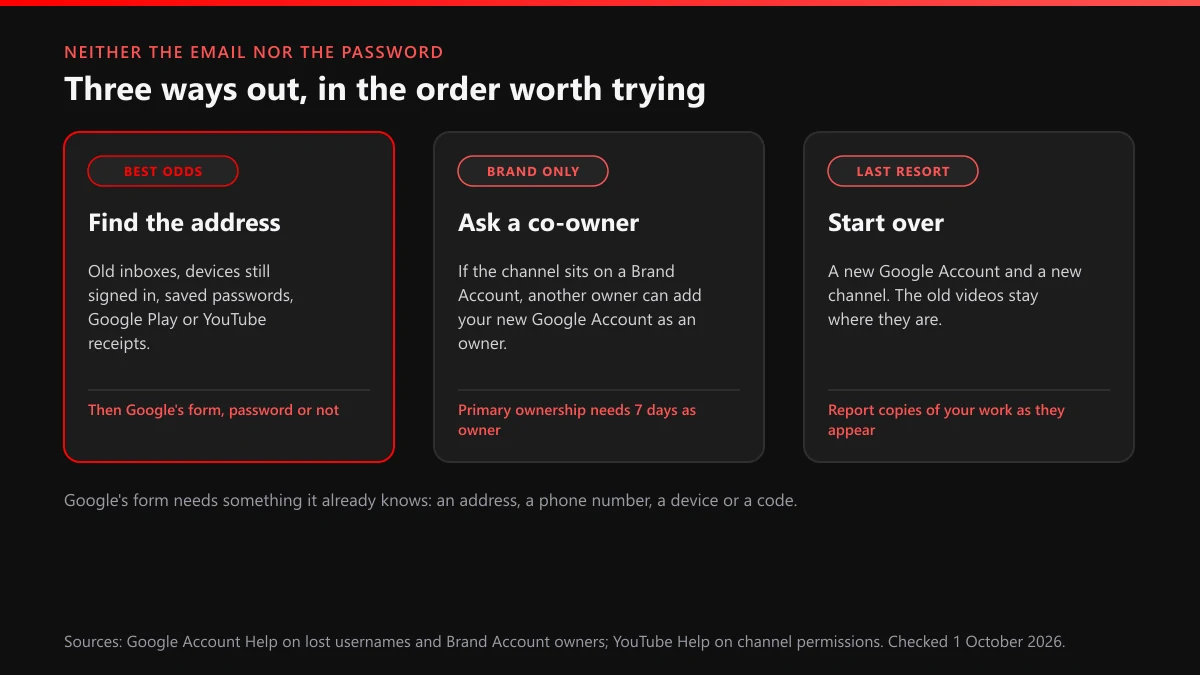
Find the address. Go back through the devices, saved passwords, inboxes and receipts listed earlier. Once the address turns up, the password matters much less, because Google's form can work from a code, a prompt or the last password you remember.
Ask a co-owner. If the channel sits on a Brand Account and anyone else was an owner, that person can bring you back. YouTube's Brand Account help says owners "control who manages the account" and can invite new users by email, so they can add a fresh Google Account of yours. A new owner has to hold the role for 7 days or more before becoming primary owner.
Start over. For a channel opened on a pre-2009 YouTube username, YouTube's old account help is blunt: "there is no password recovery option for these accounts." Old usernames are a separate case, and what YouTube does with old usernames and handles covers whether a name can be released. If the old channel was later terminated rather than abandoned, what survives a terminated or a deleted channel sets out the difference, and how a termination appeal is written takes over from there. A new channel can't inherit old subscribers, but it can keep strangers from trading on your name.
Who moves onto your channel's name while you can't sign in?
Copycats and fake helpers, usually within days of a public "I lost my account" post. They follow the same pattern every time: the scammer offers to recover the account, then asks for codes or a fee. Paid ads that promise to unlock accounts can be sent through flagging ads that promise to unlock accounts, a video selling "recovery" through reporting one video that pitches fake recovery, and fake support replies through reporting impostor replies under your videos. Our walkthrough of what a reviewer does with each flag explains why one precise report beats ten vague ones. Once you're signed in again, blocking an account from your comments keeps the same accounts out.
Your videos are the other target. A channel left without its owner is easy to copy, and re-uploads under a lookalike name follow. The order to take down stolen copies in starts the copyright side, the copyright removal request form is where the notice goes, and removing a single upload that can't wait handles the urgent one. Copies that reach your own channel can leave a copyright strike earned by someone else's upload, which is one more reason to act early. A lookalike wearing your name and picture is an impersonation case; which option a whole-channel report needs explains the choice, and where the clone uses a registered brand, a trademark complaint against a counterfeit channel is open too. If the intruder spread lies from your hijacked channel, reporting a hijack and the falsehoods posted from it applies, and the takedown route for a channel built on your uploads ties the steps together.
The same sellers who promise recovery also sell the reverse. What paid mass-report bots really do and the bot panels sold as ban services take that trade apart, and the pitch looks the same on Instagram, as our pages on Instagram mass-report tools and the Instagram spam-report bot pitch show. For a copycat that clearly breaks YouTube's rules, getting a rule-breaking copycat banned the proper way is the method that holds up. YouTube Ban Service doesn't recover Google Accounts and never asks for logins. We report impostors and stolen copies through YouTube's official routes, YouTube decides every case, and a fan channel that says what it is breaks no rule. The removal cases we take on lists the rest.
What should you set up today so the address never matters again?
Two routes that don't depend on a single phone or inbox. Most of the dead ends on this page happen because the account had one way in and it went away. Once you're signed in, spend ten minutes on these:
- Write the account's full address on paper and keep it with your other documents. It sounds too simple, and it's the thing people most often lose.
- Check the recovery phone and recovery email, and replace anything you can't reach today.
- Print a set of backup codes and store them away from the laptop.
- Add two recovery contacts and, if your account qualifies, a selfie video at g.co/signin-selfie.
- In YouTube Studio, give one trusted person channel access, so a single lost login never strands the channel.
If an impostor or a stolen copy is already live, send us the channel link and we'll tell you which route fits, or browse the full set of YouTube guides we keep for the rest of the clean-up.
FAQ
Can Google find my email from my YouTube channel name or handle?
Not through any form we found. The Find your email screen takes only a phone number or a recovery email, and nothing in Google's recovery accepts a channel name, a handle or a channel URL. YouTube says every channel is tied to at least one Google Account, and the search runs on that account's details.
Can I sign in to YouTube with my phone number instead of my email?
Often, yes. YouTube's sign-in box is labelled Email or phone, so a number linked to the account can stand in for the address. If the number isn't accepted there, run Forgot email? with it and the full name on the account to see which addresses it belongs to.
My recovery phone is an old number I don't have any more. What now?
Choose Try another way on the code screen and look for a route that skips the phone: a recovery email, a phone that is still signed in, or a printed backup code. A new number you add later can take up to 7 days to count during recovery, so don't swap numbers in a panic.
Is there a YouTube support number I can call to get my account back?
No. Google's help says you can't call Google for help to sign in to your account, and that it doesn't work with any service claiming to offer account or password support. A number in an ad or a comment that claims to be YouTube recovery belongs to someone else.
Can I recover an old YouTube channel when I have neither the email nor the password?
Only if its Google Account can still be identified. For channels on a pre-2009 YouTube username, YouTube says there is no password recovery option at all. For newer channels, a co-owner on a Brand Account can add a fresh Google Account of yours; otherwise you need the address first.
Can I set up selfie video sign-in after I'm already locked out?
No. Google's selfie video sign-in, announced on 23 July 2026, has to be set up while you can still get into the account, and Google says it isn't available for every region, account or device. Add it at g.co/signin-selfie once you're back in, next to backup codes and recovery contacts.