27 September 2026 · YouTube Ban Service · ~15 min read
How can you delete a YouTube channel, account or video?
From a computer: open YouTube Studio, go to Settings, Channel, Advanced settings, and click Remove YouTube Content, then choose to permanently delete your content. That removes the channel but keeps your Google Account and Gmail. The YouTube app has no delete option, and a single video is deleted from Studio's Content page.
Which delete button matches what you want gone?
There are four, and each takes more with it than the one before: a single video, the whole channel, the Brand Account a channel sits on, or the Google Account that owns everything. Most people who look up how to delete a YouTube account only want the second. The channel goes, while Gmail, Drive, Photos and Play purchases stay.
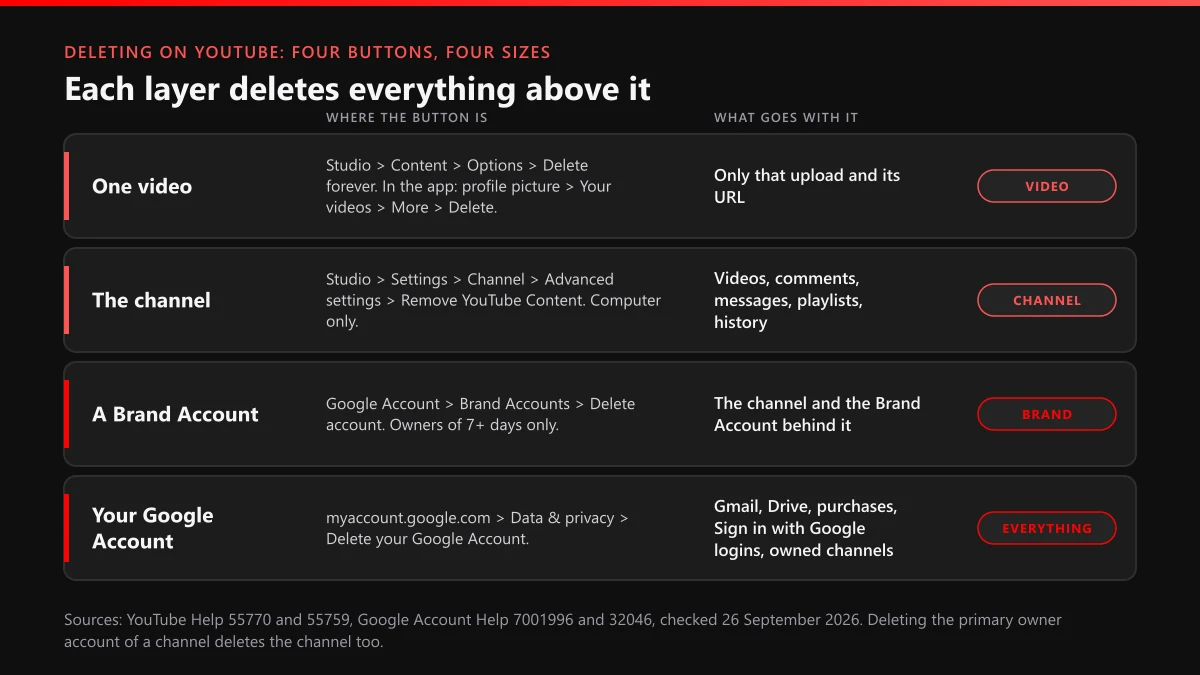
The layers nest, and that is where accidents happen. Delete a Google Account and YouTube deletes every channel for which that account is the primary owner, a rule stated in the same help article that explains channel deletion. Delete a single video and nothing else moves: the channel, its subscriber count and its other uploads carry on as before. A channel owned by somebody else never appears in any of these menus for you. YouTube alone can remove it, through the official channel takedown routes that start from a policy or copyright violation. YouTube Ban Service works on that last route only, and only for channels that break a rule.
How long does a deleted YouTube channel take to disappear?
The button works in seconds and the cleanup takes weeks. YouTube's help article says permanent deletion "may take some time," and that thumbnails of your videos can keep appearing on the site for a short while after you confirm.
Google puts numbers on the part YouTube leaves vague. Its page on how Google retains data says removing deleted data from its active systems generally takes around 2 months, a period that "often includes up to a month-long recovery period" in case something was deleted by mistake. Copies held in backup systems can last up to 6 months. Those timings describe Google's storage rather than what viewers see, and the public channel page goes long before the servers forget it.
Analytics keeps a faint trace. Watch time from a deleted channel stays inside aggregate reports, with no channel name attached.
Whose channel is selected when you press delete?
Whichever channel is active in YouTube Studio at that moment, and on accounts that manage more than one channel it is often not the one you meant. Before opening any settings, click your profile picture on youtube.com, choose Switch account, and check the name and @handle of the channel you want gone. The hide-or-delete page acts on that channel and on nothing else. YouTube Ban Service asks for an @handle or a channel URL on every case for the same reason: channel names repeat, handles don't.
Channels that live on Brand Accounts
Since 4 August 2021, Google's Brand Accounts can only be linked to YouTube channels, and a channel created with the "use a business or other name" option sits on one. Two rules on Google's Brand Account help page change the plan. You can delete the Brand Account, which takes its channel with it, only as an owner, and only after holding that role for 7 days; a newer owner gets an error message instead. A deleted Brand Account also shows up under Deleted accounts for a while, where an owner can restore it, which gives this route a safety net the Studio delete button lacks.
Managers can't delete a Brand Account. If the owner left years ago, getting ownership transferred comes before any delete button.
How can you delete a YouTube channel from a computer?
Seven clicks in YouTube Studio, made on the channel you switched to first. YouTube's help page on deleting or hiding your channel gives this path in its Computer, Android and iPhone versions alike, and it runs in a desktop browser:
- Go to studio.youtube.com and sign in with the account that owns the channel.
- Click Settings in the left sidebar.
- Open the Channel tab, then Advanced settings.
- Scroll to the bottom and click Remove YouTube Content; Google may ask for your password again.
- Choose I want to permanently delete my content.
- Tick each box that confirms what will be deleted.
- Click Delete my content.
Step 5 is where people slip, because the same page offers I want to hide my channel as the other choice. Deleting removes your videos, comments, messages, playlists and history for good. The Google Account you signed in with keeps working for Gmail and every other Google service afterwards.
Can you delete a YouTube channel on a phone?
Not in the YouTube app. The help article states that you "can't currently delete a channel on mobile devices," and the steps it gives start in YouTube Studio on the web. When YouTube Ban Service checked the Computer, Android and iPhone versions of that article on 26 September 2026, we saw the identical sentence in all three, so this is policy rather than a missing button in one app.
A phone browser can still get there, because Studio is an ordinary website:
- In Chrome or Safari on the phone, switch on the desktop version of sites (Chrome: three-dot menu, Desktop site; Safari: the page settings menu, Request Desktop Website).
- Go to studio.youtube.com and sign in to the account that owns the channel.
- Zoom out to find Settings in the left sidebar, then Channel and Advanced settings.
- Tap Remove YouTube Content and pick the permanent delete option, as on a computer.
It is fiddly on a small screen, and Studio sometimes pushes you toward its app. If it does, five minutes on any computer beats fighting it. A second road runs through myaccount.google.com, then Data & privacy, then Delete a Google service: if YouTube is listed there for your account, its delete option opens the same hide-or-delete page.
Hiding the channel instead: what changes, and how does it come back?
Hiding turns your channel name, videos, likes, subscriptions and subscriber list private, and it can be undone. It lives on the same Remove YouTube Content page (choose I want to hide my channel), which makes it the sensible first move for anyone who might want the channel back next year.
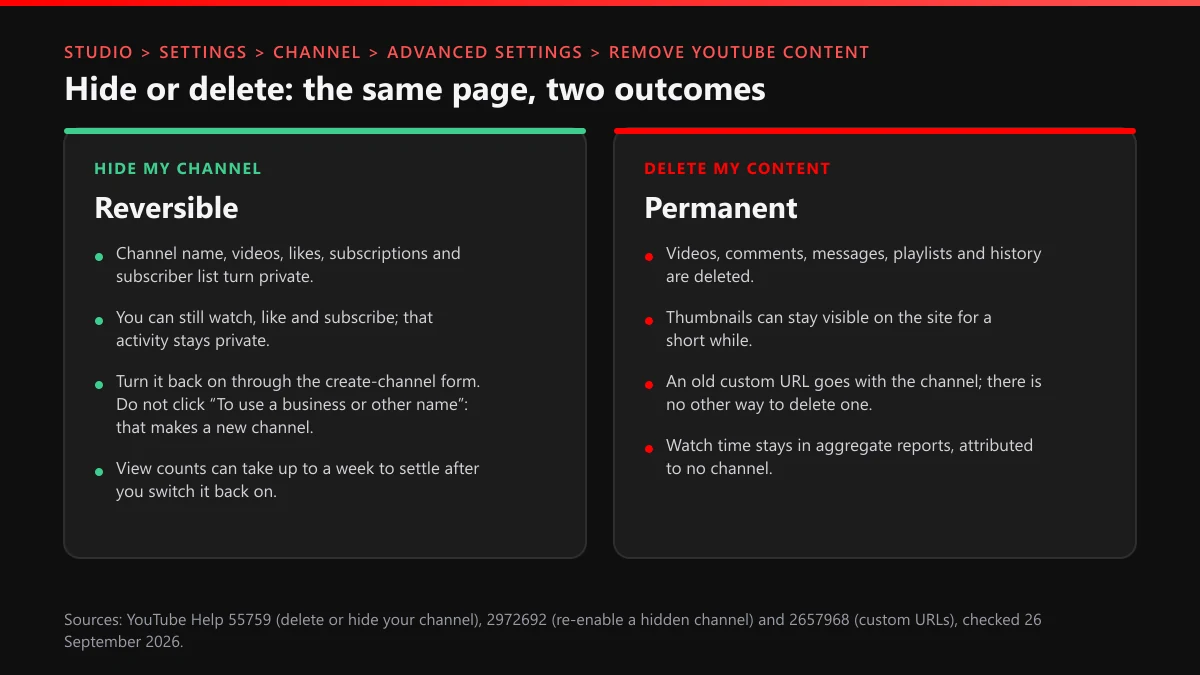
Bringing it back has a trap in it. YouTube's re-enable instructions send you to the create-a-channel form and warn against the link that reads "To use a business or other name, click here," because that link creates a new channel instead of restoring the hidden one. Fill in the plain form and the old channel returns, though view counts can take up to a week to settle. A hidden channel on a Brand Account comes back through your profile picture, Settings, Account, Add or manage your channel(s), then the hidden channel's name.
If one commenter is the reason you want out, hiding a single user from your channel fixes that without touching anything else.
Removing a YouTube account can mean three different jobs
The first job is the channel, covered in the steps above: your videos and comments go, your Google Account stays. The second is taking an account off a device while deleting nothing. On a TV or game console, the YouTube app's accounts page has a Remove Account option; if the TV is out of reach, myaccount.google.com/device-activity signs that device out remotely, and the permissions page of your Google Account can remove YouTube on TV access altogether. The third job, deleting the whole Google Account, is the one to slow down for. All three need your own sign-in, so YouTube Ban Service or any other outsider can't do them for you.
Deleting the Google Account behind the channel
Google's steps are short: myaccount.google.com, Data & privacy, then More options under your data and privacy options, then Delete your Google Account. The list of losses is long. Google names your email, files, calendars and photos, the Google services you sign in to, and "subscriptions and content you bought with that account on YouTube or Google Play." Any channel the account holds as primary owner is deleted with it. Other Google Accounts you own survive; deleting one never deletes the rest.
Glassdoor and other logins that ride on Sign in with Google
Every site you open with Sign in with Google loses that door when the Google Account goes. Google's own checklist asks you to move banking, social media and app logins that use your Gmail address to another email first, and Sign in with Google logins need the same treatment. Glassdoor is one example. Its help page on social accounts, updated 7 April 2026, tells users connected through Google to disconnect it under Account Settings, Social connections, and also to delete Glassdoor from the Google Account's third-party connections. Profiles already synced with Indeed can't add or remove Google there at all.
A full Glassdoor delete account request is a separate job. Glassdoor's account and personal data deletion article, updated 22 January 2026, sends you to a personal data request form: pick deletion of your personal data, choose Glassdoor + Fishbowl as the site, and enter the account's email, then confirm through the link Glassdoor emails you. It warns that your reviews, salary information, posts and comments go with it. When YouTube Ban Service tried the older How-do-I-delete-my-account help link that still circulates on forums, it redirected to the help-center home, so start from the current article.
How do you delete a YouTube video but keep the channel?
Use the Content page of YouTube Studio on a computer, or Your videos in the phone app, and expect the deletion to be permanent either way. On a computer:
- Open YouTube Studio and select Content in the left menu.
- Hover over the video, click Options (the three dots), then Delete forever.
- Tick the box confirming you understand the video will be permanently deleted.
- Click Delete forever.
In the YouTube app on Android or iPhone, tap your profile picture, then Your videos, then the More menu beside the video, then Delete, and confirm. Studio also deletes videos in bulk. There is no replace option: every new upload gets a new URL, so fixing a mistake means trimming or editing the original, or uploading again and losing the old link.
Pulling a video down doesn't wipe a strike attached to it, and YouTube says it can still issue a Community Guidelines strike on content that was already deleted.
Copyright follows the same rule with one exception. When a removal request is scheduled, the uploader gets 7 days to delete the video and avoid the strike, which is how the 7-day copyright removal option is meant to work.
A video someone else uploaded is out of your reach: only its uploader or YouTube can delete it. Flagging a single video under the right policy is the everyday route, getting someone else's video taken down covers the legal ones, and stolen copies of your uploads go through copyright. YouTube Ban Service files on that side of the fence, for uploads that break a rule or copy your work.
What should you save before anything is deleted?
Your videos, because Studio's download button has limits most people discover on the last day. YouTube's download help says Studio hands you an MP4 in 720p or 360p depending on the video size, allows five downloads of the same video in 24 hours, and won't download a video that was removed or carries a copyright or Community Guidelines strike. Google Takeout exports every upload at once, which suits a whole channel far better.
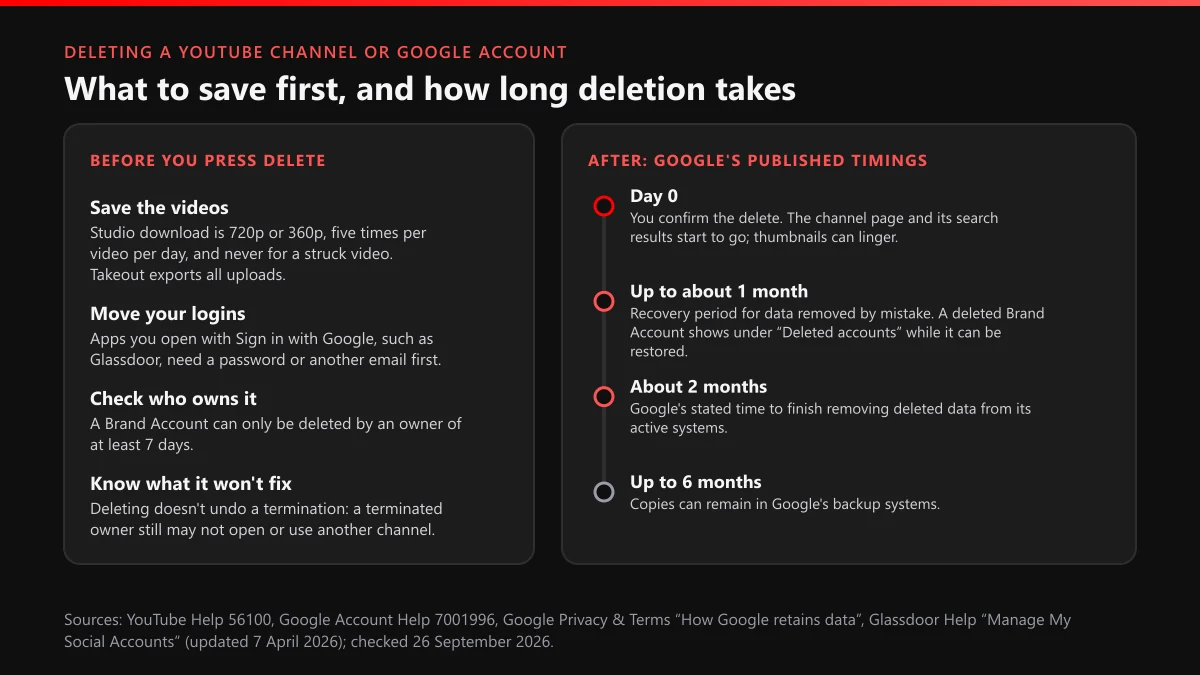
Timing matters more than it looks. YouTube's terminations page says a terminated channel can no longer download its YouTube content, only its wider Google data, so a creator already sitting on two strikes should export before anything else happens. The same goes for comments you want to keep, since a channel deletion removes them along with messages and playlists, and a Takeout export is the only record left afterwards. Then move your Sign in with Google logins and confirm which Brand Account you are standing in.
What if you can't sign in to the channel you want gone?
Then nobody can delete it for you, because every delete path starts with signing in as the owner. The fix is Google's account recovery at accounts.google.com/signin/recovery, ideally answered from a device and a place where you used that account before. YouTube publishes no form that deletes a channel for someone locked out of it.
Waiting for Google to tidy it away is a poor plan. Google's May 2023 inactive-account announcement, written by Ruth Kricheli, VP of Product Management, set a 2-year inactivity rule with deletions starting in December 2023, yet it also said "we do not have plans to delete accounts with YouTube videos at this time." The current policy page no longer repeats that line, and it counts watching a YouTube video while signed in as activity. The same announcement gave Google's reason for worrying about dormant accounts: they are "at least 10x less likely" than active ones to have 2-step verification set up, which is how an abandoned channel can end up hijacked and posting under its old name. If that happens to yours, treat it as a hijacking and report it. Anyone in your comments or messages offering to delete or recover the channel for a fee is running a scam; report scam offers like these instead of answering them. YouTube Ban Service never asks for a password or a recovery code, and no honest helper will.
Why does a removed YouTube channel still show up, or show as unavailable?
Usually because deletion is still running, or because the channel you are looking at was removed by YouTube, not by its owner. Enforcement removes channels at a scale most people don't expect. Google's YouTube Community Guidelines transparency report counts 2,732,395 channels removed between April and June 2026, with 2,310,181 of them (84.5%) removed for spam, deceptive practices and scams, and 86,686,063 videos taken down along with those channels. YouTube Ban Service files reports into that same review, and those counts are YouTube's own decisions rather than anyone's report totals.
| What you see | Likely reason | What to do |
|---|---|---|
| Your deleted channel still loads, thumbnails and all | Deletion hasn't finished; YouTube says thumbnails can linger for a short while | Check again the next day in a signed-out window before assuming it failed |
| The hide-or-delete page names a channel you didn't expect | You're signed in to another channel or Brand Account | Switch account from your profile picture, then reopen Studio settings |
| A channel link opens an empty "not available" page | Its owner deleted it, or YouTube terminated it | Read how terminated and deleted channels differ; nobody but its owner or YouTube can bring it back |
| Your old @handle is still taken | YouTube publishes no release timeline for a deleted channel's handle; its 14-day hold covers handle changes only | Pick a variant, or read how handles are claimed and freed |
| Your deleted videos turn up on another channel | Someone saved copies before you deleted | Report the reupload or file a copyright request as the owner |
| A new channel uses your old name and photo | Impersonation, which deleting your own channel can't stop | File an impersonation or hijacking report |
Does deleting a channel get rid of strikes or a termination?
No, and it can close a door you may want later. YouTube's strike basics page says "Deleting your content doesn't remove a strike," and a termination follows the person rather than the channel: once terminated, you are barred from using, owning or creating any other channel, including channels you acquire and ones you are prominently featured in.
The newer cost is the second-chance pilot. YouTube now lets some terminated creators ask for a new channel one year after the termination, excluding copyright and Creator Responsibility cases, and its help page on rejoining says creators who deleted their YouTube channel or Google Account won't see that request option "at this time." A creator who deletes a terminated channel in frustration may be deleting the only way back.
Appeals are what actually reverses decisions. Between April and June 2026 YouTube received 1,269,277 appeals on removed videos and reinstated 87,953, about 7%, and a terminated channel has up to a year to file one. The termination appeal walkthrough covers that process; it starts from the terminated channel's own YouTube Studio, so the owner files it, not YouTube Ban Service. For a copyright strike, the fix is a counter notification or a retraction from the claimant. And if you suspect a pile-on of false reports, the reviewer still judged the content itself, which is why mass-report bots can't produce a strike where no rule was broken.
When the channel isn't yours, what can remove it?
Only YouTube, acting on a violation. No delete request exists for another person's channel; the tools are reports under a specific policy, legal notices for copyright or privacy, and the impersonation form.
That is the work YouTube Ban Service takes on. We look at the channel first, name the rule it breaks, and file through the matching official route: a report for a scam channel, a copyright notice for stolen uploads, an impersonation report for a fake. We file and follow up, YouTube's reviewers make every decision, and a channel that keeps to the rules is one we turn down. Before contacting anyone, read what a channel report checks and what happens after a report, so the evidence you gather matches what reviewers look at. The violation-by-violation ban guide and the managed content-removal request handle heavier cases, and counterfeit and misinformation reports have forms of their own.
Skip anyone selling guaranteed deletions. Paid ban panels and report bots sell volume, and volume doesn't produce strikes; the same pitch reaches Instagram as spam-report bots and Instagram mass-report tools, with the same result. Browse the full set of YouTube reporting guides, or send us the channel link and say which rule you think it breaks.
FAQ
Does deleting my YouTube channel delete my Gmail too?
No. Deleting the channel from YouTube Studio removes its videos, comments, messages, playlists and history, while Gmail and Drive keep working on the Google Account you signed in with, and Gmail only goes if you delete that whole account or remove Gmail on its own under Data & privacy, which needs a second email address on the account first.
Can I get a deleted YouTube channel back?
Not through YouTube. A channel deleted from Studio is gone for good, which is why the hide option exists. An owner can still restore a deleted Brand Account from Deleted accounts for a while. A deleted Google Account can sometimes be recovered through Google's account recovery, but only if you act soon.
How long until someone else can take my old @handle?
YouTube doesn't publish a figure for handles of deleted channels. The only number on its handle help pages is the 14-day hold after you change a handle, during which you can switch back. Treat the handle as lost the moment you delete, and if it matters, keep the channel hidden rather than deleted.
Do comments I left on other people's videos disappear?
Yes, because YouTube lists comments among the content a permanent channel deletion removes, so replies under other creators' videos go along with your messages and playlists. If a thread matters as evidence, such as a harassment dispute you already reported to YouTube, screenshot it with the date and URL before you delete.
How do you remove a YouTube video someone else uploaded?
You can't delete it yourself; only the uploader or YouTube can. Report it under the policy it breaks, or, if it is your own footage, file a copyright removal request as the rights owner. Footage that exposes your private details goes through YouTube's privacy complaint process, which the person shown files.
Will YouTube delete my old channel automatically if I stop using it?
Don't count on it. Google's inactive-account policy allows deleting personal accounts unused for 2 years. Its May 2023 announcement, though, said there were no plans to delete accounts with YouTube videos, and watching YouTube while signed in counts as activity. Delete the channel yourself, or recover the account first if you've lost access.
How do I remove my YouTube account from a TV or phone without deleting it?
On a TV or console, open YouTube, go to the accounts page, pick your account and select Remove Account. If the device is out of reach, sign it out at myaccount.google.com/device-activity. On a phone, remove the Google Account from the device's own settings; don't delete the account itself, which erases far more.