23 September 2026 · YouTube Ban Service · ~11 min read
Can you report a YouTube channel, and what gets checked?
Yes. Signed in on a computer, open the channel, click …more in its description, then Report user, and choose channel art, profile picture or the user. YouTube judges that report on the channel itself: name, handle, picture, banner and description. It says it doesn't check the channel's videos, so a bad upload needs its own flag.
What does YouTube look at when you report a whole channel?
The channel's own surface, and not much else. YouTube's reporting help for computers says the channel features it reviews "include, but aren't limited to, the channel's profile photo, handle, and description." Then comes the line most guides skip: "When you report a channel, we don't review the channel's videos." Videos you attach help the reviewer understand the channel, but YouTube says it doesn't check them for violations.
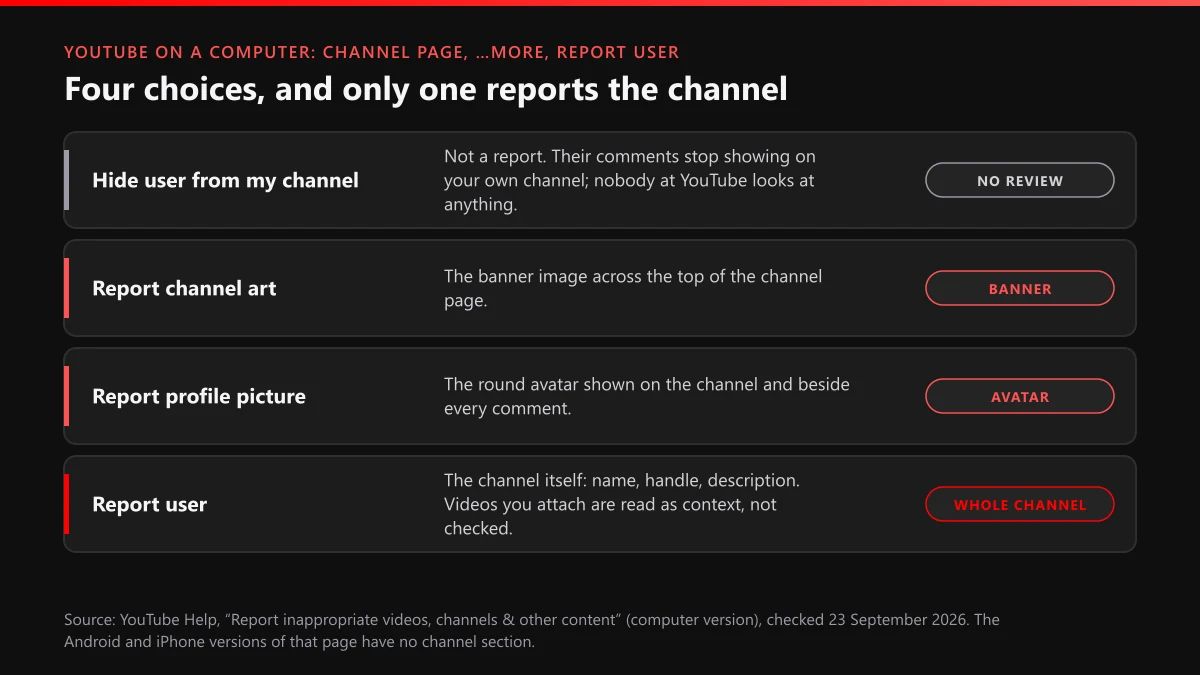
So a channel report works on things that live on the channel. A handle copied from a real creator, a banner showing gore, an avatar with nudity, a description that pushes a crypto giveaway: a channel report reaches all of those. A channel that looks clean but uploads harassment does not get caught that way. Its videos need flags of their own.
| Part of the channel | What to use | Checked by a channel report? |
|---|---|---|
| Channel name, handle, description, links | Report user | Yes |
| Round profile picture | Report profile picture | Yes |
| Banner across the top | Report channel art | Yes |
| Videos, Shorts, live streams | Report on each upload | No, attached videos are context only |
| Comments it leaves on other videos | Report on each comment | No |
| Community posts | Report on the post | No |
How do I report a YouTube channel on a PC?
Use a browser on a computer, signed in to any Google account. This is the only channel-report route YouTube documents, and it takes under a minute:
- Sign in to YouTube and open the channel's page (the one with the banner, not a video).
- Click …more at the end of the short channel description under the name.
- In the panel that opens, click Report user.
- Choose Report channel art, Report profile picture or Report user. The fourth item, Hide user from my channel, is not a report.
- Select the reason and click Next. If the window asks for more, add the details a reviewer needs.
- Click Next, then Submit.
Signed out, don't bother looking. When we opened a channel's About panel without an account on 22 September 2026, the only action we saw was Share channel. The same holds for the buttons under videos, which answer with a sign-in prompt instead of a report form.
Mac or Windows makes no difference; "PC" here just means the desktop site. That's the short version of how to report a YouTube channel on PC, and it's the version to use whenever the other routes below don't apply.
Can you report a YouTube channel on mobile?
YouTube doesn't document a way. On 23 September 2026 we opened the same reporting help page and switched its platform selector from Computer to Android, then to iPhone and iPad. The "Report a channel" section vanished both times. The mobile versions cover videos, Shorts, comments, Community posts, live chat, ads and conversations, and say nothing about channels.
That doesn't prove the app has no channel option; app menus change faster than help pages. If your app shows a report entry on the channel page, it will feed the same review. If it doesn't, you have two fallbacks for anyone who wants to report a YouTube channel on mobile:
- Open youtube.com in the phone's browser, request the desktop site from the browser menu, sign in, and follow the …more route above.
- Report the individual videos, Shorts or comments from the app, where every one of those has a documented Report button. That covers most real cases anyway, because the upload is usually the problem.
Channel art, profile picture or Report user: which one fits?
Pick the part of the channel that breaks the rules. Report channel art is for the banner image, Report profile picture for the avatar that also appears beside every comment the channel leaves. Report user is for everything that makes up the account itself: a name built around a slur, a handle that copies someone, a description full of scam links, or behaviour across the channel that fits a policy.
Hide user from my channel sits in the same menu and trips people up.
It only stops that account's comments from showing on your own channel; nobody reviews anything and the channel is untouched. If that is what you want, the guide to hiding a user from your YouTube channel covers live chat and posts too.
When a detail box appears, write for a reviewer who has thirty seconds. Name the element ("the banner, uploaded around 10 September"), quote the text that breaks the rule, and paste the links to two or three uploads that show the pattern. Those videos won't be judged, but they tell the reviewer what kind of channel they're looking at.
How to report a YouTube channel for inappropriate content in its uploads
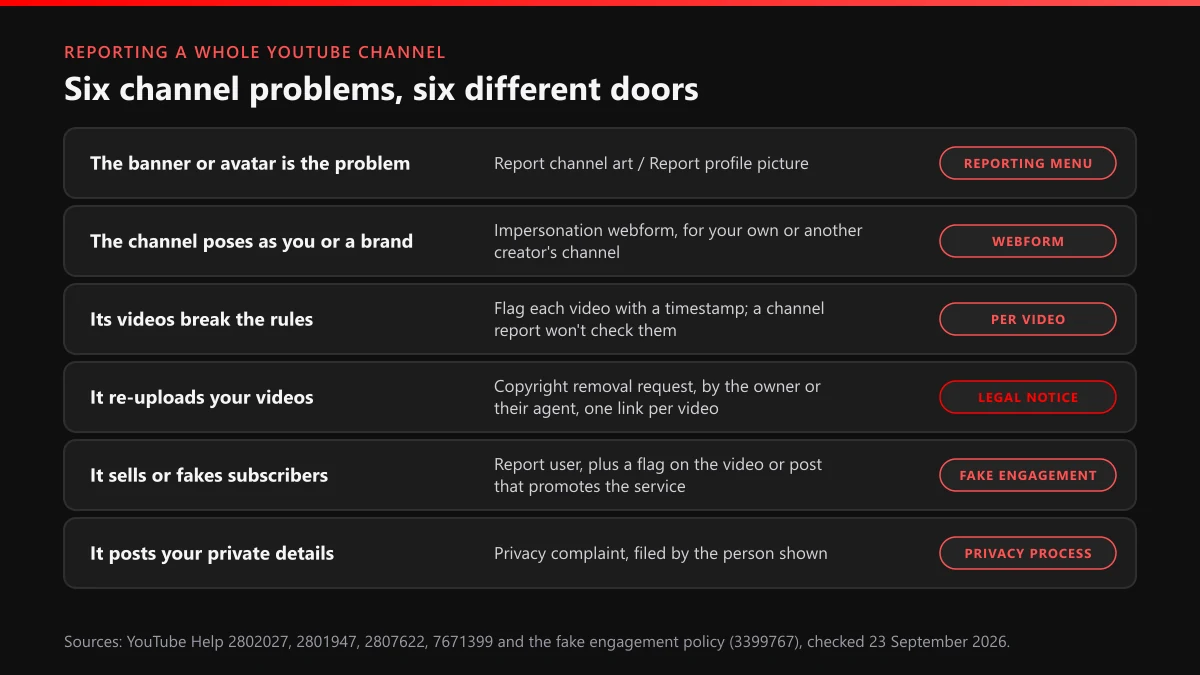
Flag the uploads themselves, one by one, and use the channel report only as a cover note. Because a channel report doesn't check videos, a channel full of inappropriate content gets reached through its videos. On a computer, click More below the video, then Report, choose the closest reason and, on Shorts, add a timestamp in the details box. The walkthrough for reporting YouTube videos, Shorts and comments has every surface.
Quality matters more than count here.
Two or three well-chosen flags beat twenty rushed ones. Start with the upload where the violation is plainest, because each removal can carry a strike, and strikes are what end channels: YouTube's strike rules say three in the same 90-day period "may result in your channel being permanently removed," while a single case of severe abuse can end it without warning.
Flagged videos show up in Reporting History, which lists videos only, so you can follow them there. A channel report never appears in it. For what the statuses mean and why "Live" can mean two things, see what happens after you report a YouTube video. If one particular upload has to come down fast, the guide to getting a YouTube video taken down covers the routes beyond a flag.
How to report a YouTube channel for buying subscribers
Report what you can point to, not what you suspect. YouTube's fake engagement policy bans content that "links to or promotes third-party services that artificially inflate metrics like views, likes, and subscribers," videos showing a creator buying traffic to promote the seller, and sub-for-sub deals. It also says that when you see several violations on one channel, you can report the channel.
The catch is evidence. A viewer can't see where subscribers came from. A jump from 2,000 to 40,000 in a week looks bad, but it could be a viral Short. What you can show is a video or description that sells growth packages, a link to a subscriber panel, or a Community post offering "sub4sub". Flag that item under spam or misleading, then send a Report user with the links in the details box.
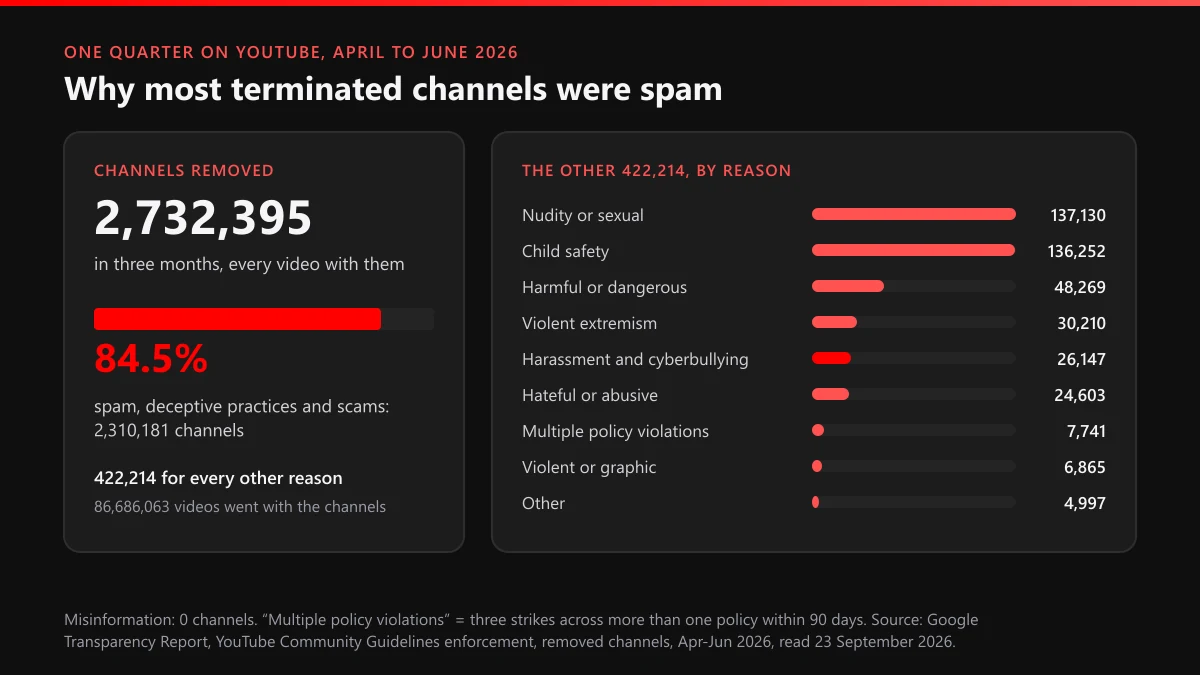
Spam is where YouTube removes channels by the million. From April to June 2026 it terminated 2,310,181 channels under spam, deceptive practices and scams, 84.5% of all removals, according to the removals section of Google's Transparency Report. The same buy-reach pitch runs on Instagram, and our note on spam report bots for Instagram accounts explains why buying reports is the same trap as buying followers.
Report a YouTube channel for stealing content? Skip the report button
If the channel re-uploads your work, the report menu is the weakest tool you have. Stolen videos are a copyright matter, and copyright runs through a legal notice: a copyright removal request filed by the owner or someone authorised to act for them. It lists the individual video links, and a valid one removes the upload and usually puts a copyright strike on the channel. Three copyright strikes end a channel just as three Community Guidelines strikes do.
Two conditions come with it. You have to own the work or represent whoever does; a fan can't file for a creator. And your name travels, because the notice's contact details can be passed to the uploader. For the full sequence against a thief, start with the takedown guide for stolen YouTube videos. The form fields and the seven-day option are covered in filing a YouTube copyright removal request, and the penalty side in how a YouTube copyright strike works. For a channel that re-uploads under fresh names after each removal, see reporting YouTube reuploads and ban-evasion channels.
Can you report a YouTube channel anonymously?
Through the report menu, yes.
YouTube's help says "reporting content is anonymous, so other users can't tell who made the report," and that covers a channel report the same way as a video flag. The channel owner hears about a removal or a strike, never about the person who reported it. Anonymity ends where a report turns into a legal notice. A copyright notice can reach the uploader with your name on it. Legal complaints, which you reach from the channel through Report and then Legal issue, can be forwarded to the Lumen database, though Google withholds the sender's contact details. In the EU, a notice under the Digital Services Act asks for your name and email.
If you want to report a YouTube channel anonymously and it sells fake goods under someone's trademark, that is a legal complaint, so expect your details on file. The page on reporting counterfeit and misinformation on YouTube sorts out which form fits and what each one asks for.
What happens when you report a YouTube channel?
A reviewer decides, and until then nothing changes. YouTube's help is explicit that reported content is "not automatically taken down." For a channel, the review ends one of three ways: nothing happens because no rule is broken, the offending piece is dealt with and a warning or strike may follow, or the channel is terminated.
Termination has three triggers, which the Transparency Report spells out: three Community Guidelines strikes in 90 days, a single case of severe abuse "such as predatory behavior," or a channel "wholly dedicated to violating our guidelines (as is often the case with spam accounts)." When a channel goes, its videos go with it. Between April and June 2026 that took down 86,686,063 videos from 2,732,395 terminated channels. Harassment and cyberbullying accounted for 26,147 of those channels, a small share next to spam.
Don't wait for a message.
You won't get a result notice. Channel reports never appear in Reporting History, which lists flagged videos only, so the channel page itself is your only signal: it keeps loading, or it stops. The owner gets an email and can appeal, and a terminated owner is barred from "using, creating, or acquiring another channel" to get around it. What each outcome means on the owner's side is covered in terminated vs deleted YouTube channels.
Can reporting get someone's YouTube channel banned?
Only if the channel breaks a rule, and then one precise report beats a hundred loud ones. YouTube's help is plain about volume: if reviewers find no violation, "no amount of reporting will change that." Search "how to get someones YouTube channel banned" and you'll find offers to buy mass reports. Our look at mass report tools and who really gets banned shows why the account running them is the likelier one to lose.
What removes a channel is the right route with evidence attached. Impersonation goes to YouTube's impersonation form, which accepts reports for "yours or another creator's channel"; a hijacked or cloned channel is covered in reporting YouTube hijacking, defamation and deepfakes. A scam channel usually breaks spam rules through its videos and links, see reporting YouTube scam channels and ads. Your private details go to the privacy complaint process.
Before we file anything, we check that the channel breaks a specific rule, collect the upload or element that shows it, and pick the one route that can act on it. YouTube makes every decision, and a channel that breaks no rule is one we turn down. If you'd rather hand it over, the YouTube content removal service works that way. Doing it yourself? File the channel report for what sits on the channel, flag the worst two uploads, and don't send a second channel report while the first is under review.
FAQ
How to report a YT channel that only posts Shorts?
Report the Shorts, since a channel report doesn't check uploads. In the Shorts player, open More (bottom-right on a computer, top-right in the app), then Report, and add a timestamp when asked. Add a Report user from a computer only if the name, avatar or description also breaks a rule.
How many reports does it take to ban a YouTube channel?
There is no number. Reviewers judge the channel against the rules, and YouTube says that without a violation "no amount of reporting will change that." Terminations come from strikes, one case of severe abuse, or a channel dedicated to breaking the rules, not from a report count.
Will the channel owner find out I reported them?
Not from YouTube. A channel report is anonymous; the owner is told about a removal, strike or termination, never who asked for it. A copyright removal request is different, because your name and contact details can reach the uploader.
Can I report a YouTube channel without an account?
No. Signed out, the channel's About panel on 22 September 2026 offered nothing but Share channel, and the video buttons only showed a sign-in prompt. Sign in first, and do it on a computer if you want the channel menu.
How do I report a channel that pretends to be me or another creator?
Use YouTube's impersonation form rather than Report user. It accepts reports about your own identity or "another creator's channel," asks for the fake channel's link, and suits copies that add words like "Official" or "Backup" to a real name.
How to report channels on YouTube that one person runs?
Report each one that breaks a rule on its own, with its own evidence. If a terminated owner has opened a new channel to get around the ban, say so in the details and link the old channel; YouTube's rules bar terminated users from creating or acquiring another one.