28 September 2026 · YouTube Ban Service · ~14 min read
How to recover YouTube account access, by what the screen shows
How to recover YouTube account access depends on what the screen shows you. A rejected password goes to Google's form at accounts.google.com/signin/recovery. A hacked channel needs that form first and YouTube's cleanup after it. A termination notice needs an appeal, a hidden channel can be restored, and a deleted one can't.
Which recovery page matches what you're seeing?
Start from the symptom, not from a search result. "I lost my YouTube account" covers six different situations, and each one is handled on a different page by a different part of Google. People lose days filling in the right form for the wrong problem, such as appealing a termination while the hacker still holds the login, or running Google's recovery over and over for a channel they deleted themselves.
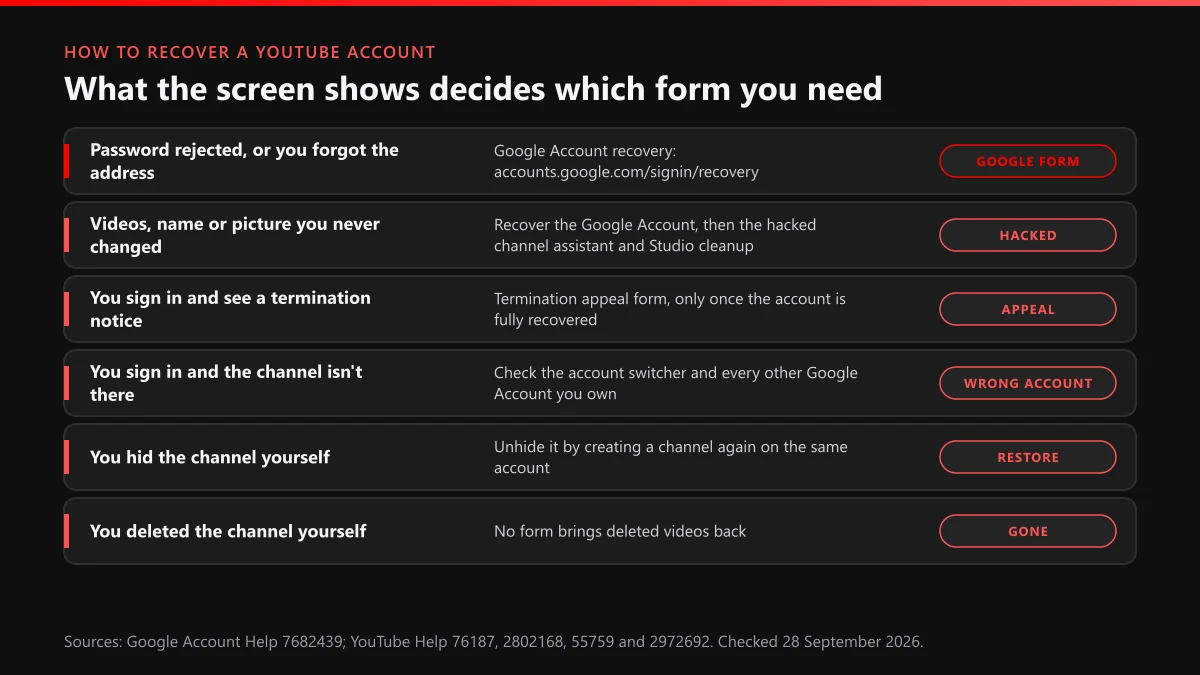
| What you see | What it usually means | Where to go |
|---|---|---|
| Wrong password, or you can't remember the address | You're locked out of the Google Account behind YouTube | Google's recovery form, accounts.google.com/signin/recovery |
| Uploads, a name or a picture you never changed | Someone else is signed in as you | Google's form first, then YouTube's hacked channel help and Studio cleanup |
| A termination notice after you sign in | The channel was removed, often during a takeover | The termination appeal, once recovery is finished |
| You sign in fine and the channel isn't there | You're on a different Google Account, or the channel sits on a Brand Account | The account switcher under your profile picture |
| You hid the channel months ago | The content is stored, just not shown | Create a channel on the same account to re-enable it |
| You deleted the channel | Videos, comments and playlists are gone | Nothing restores them |
| The address ends in a school or company domain | An administrator controls the account | That administrator |
Two things follow from that table. First, the youtube account recovery page most people are looking for isn't on youtube.com at all. YouTube's hacked channel help says every channel is associated with "at least one Google Account," and a login problem is always a problem with that account. Second, there is no single youtube channel recovery form. The channel side has three separate tools, and each one opens only after the Google login is back in your hands: a chat assistant for hacked channels, the cleanup tool inside YouTube Studio, and the appeal for terminated channels. If the channel turns out to live on a Brand Account or a school address, our guide to recovery by the type of Google Account covers who holds the key in each case.
What does the YouTube account recovery process look like, start to finish?
Five stages, and most failures happen in the first one, before the form is even open. Google decides whether you're the owner by comparing what you give it now with what it already knows, so the setting you run the form in matters almost as much as your answers. Google's tips for account recovery ask you to "use a computer, phone, or tablet where you frequently sign in" and the browser you normally use. Here is the whole youtube account recovery process in order:
- Prepare before you open anything: pick the phone or laptop you've used YouTube on for longest, go to where you normally use it, and write down every old password and recovery address you can remember.
- Type accounts.google.com/signin/recovery into the address bar yourself and enter the email or phone number on the account. Use Forgot email? if you only remember the recovery details.
- Answer every question. Google says "take your best guess rather than moving on to another question," and for the last password you remember, "enter the most recent one you recall."
- Accept any code Google offers to a recovery phone or email you still control. If Google needs time, it asks for a contact address. Give one you can read today and watch its spam folder.
- Once you're in, set a new password, sign out every session you don't recognise, then open YouTube and check the channel, its permissions and YouTube Studio before you do anything else.
That last stage is where you recover your YouTube account rather than just the Google login. A takeover leaves traces on the channel that a password reset doesn't touch, and a channel that looks normal from the home page can still have a stranger listed as a manager. There's no penalty for a wrong answer and no attempt limit. There is a cost to hammering the form from a friend's phone or a new browser, though, because every unfamiliar device reads to Google as one more reason to doubt you.
What we saw when we opened the recovery page on 28 September 2026
We opened accounts.google.com/signin/recovery on 28 September 2026, signed out, from a browser that had never signed in to the account we were thinking of. It didn't stay on that address. It moved to a longer one ending in recoveryidentifier and showed a single box for an email or phone number, a Next button and a Forgot email? link, all in our browser's language rather than English. There was no mention of YouTube anywhere on it. The same morning we tried the address YouTube once used for contacting support, support.google.com/youtube/gethelp. It dropped us on the YouTube Help topic index, and the only "need more help" option at the bottom was to post to the help community. That's the realistic picture: one Google form for the login, and a community forum for everything the form can't answer.
Why does YouTube login account recovery fail, and what fixes each problem?
Usually because Google can't match enough signals, not because you gave a wrong answer. A youtube login account recovery attempt ends with a screen saying Google couldn't verify that the account is yours when the device, place, answers and recovery options all look unfamiliar at once. Each common youtube account recovery problem has a narrower fix than "try again":
| Problem | Why it happens | What to do |
|---|---|---|
| "Couldn't verify this account belongs to you" | Too few matching signals in one attempt | Wait a few days, then retry from your usual device and location, answering every question |
| The recovery phone number is no longer yours | The code goes to a line you can't reach | Choose "try another way" on the same screen; don't start the form over |
| You just changed the recovery phone or email | New details aren't trusted yet | Google says changes "may take up to 7 days" to take effect; retry after that |
| The 2-Step Verification phone is lost | The second step can't be completed | Use printed backup codes, a security key or an authenticator app you set up earlier |
| The recovery email is a dead Hotmail or Yahoo inbox | Google can't reach you there | Recover that inbox through its own provider first |
| The address belongs to a school or employer | An administrator owns the account | Ask the administrator; Google's steps "might not work" here |
| The password works, the channel doesn't appear | Wrong Google Account, or a Brand Account | Open the account switcher and check every account you own |
The seven-day rule catches people who panic. They lose access, add a new phone number from another session, and then find that the brand-new number counts for nothing in recovery for a week. Google's recovery help says it plainly: "If you change your account recovery info, it may take up to 7 days for those changes to take effect. Try to recover your account again in a few days." It also says there's "no limit to the number of times you can attempt to recover your account," so patience costs you nothing except time.
Backup codes deserve a line of their own, because they're the fix most people had and forgot. When YouTube made 2-Step Verification mandatory for anyone with access to a monetizing channel in the YouTube Partner Program, TeamYouTube's own reminder listed the fallbacks for creators without a reliable phone: a security key, an authenticator app, a voice call to a landline, and "backup codes to sign in." If you printed a sheet of eight-digit codes years ago, find it before you do anything else.
How do you recover a YouTube channel, not just the login?
By fixing the account first and the channel second, every time. How to recover a YouTube channel depends on what happened to it, and the four outcomes have very different endings. A hacked channel can usually be put back. A terminated one can be appealed. A hidden one comes back with one form. A deleted one is gone.
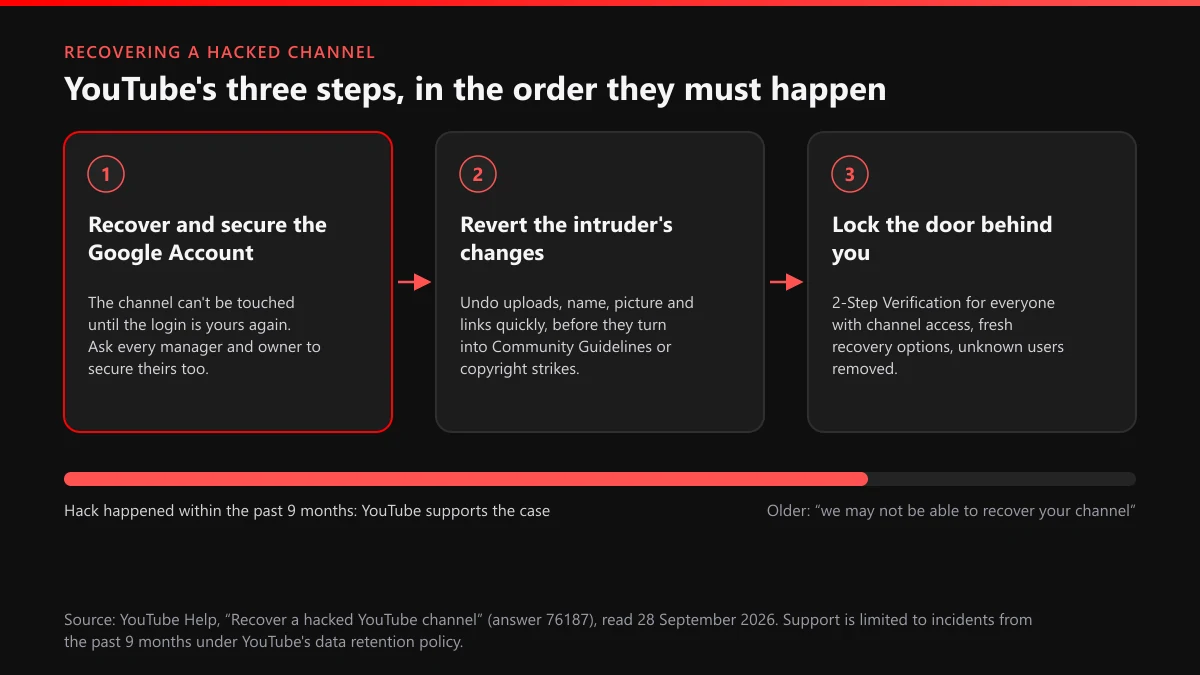
Hacked. YouTube's help sets out "3 steps to recover your YouTube channel": recover and secure the Google Account, revert the intruder's changes "immediately to avoid policy repercussions like Community Guidelines or copyright strikes," and reduce the risk of it happening again. The order is fixed. It also asks you to get every manager and owner to secure their own Google Account, because an intruder who came in through a manager's login can come back the same way. Then there is the clock: "Support is limited to potential hacking incidents that occurred within the past 9 months due to our data retention policy." A takeover you notice in month ten may be beyond YouTube's reach even after you have the login back. Videos the intruder streamed can leave a copyright strike the intruder left behind on your record, and reports aimed at the hijack itself run through reporting a hijacked channel and the defamation that follows.
Terminated. This is an appeal, not a recovery. YouTube's termination appeal help gives creators "up to 1 year from the date their channel was terminated" to appeal, and caps how many appeals a single termination allows. If the termination came during a hack, the hacked-channel page adds a warning worth taking literally: "Your appeal may not be accepted if the account recovery is incomplete." So finish the login, clean up, then appeal. Our walkthrough on appealing a YouTube ban step by step covers what to write.
Hidden or deleted. YouTube's hide or delete help separates the two sharply. A hidden channel can be re-enabled: go to create a channel on the same account and fill in the form, which "will restore your YouTube channel." Deleting is different: it "will permanently delete your content, including videos, comments, messages, playlists, and history." Our explainer on the difference between a terminated and a deleted channel goes through what, if anything, survives each. If what you really miss is the old name rather than the videos, claiming back an old YouTube username explains what YouTube will release.
Can you contact YouTube to recover an account?
Only in limited ways, and none of them can reset a password. Anyone who wants to contact YouTube to recover an account runs into the same wall: the login belongs to Google, and Google handles it through the form alone. Google's recovery help puts it in one line: "For your security, you can't call Google for help to sign into your account." What YouTube offers sits around that form, not instead of it.
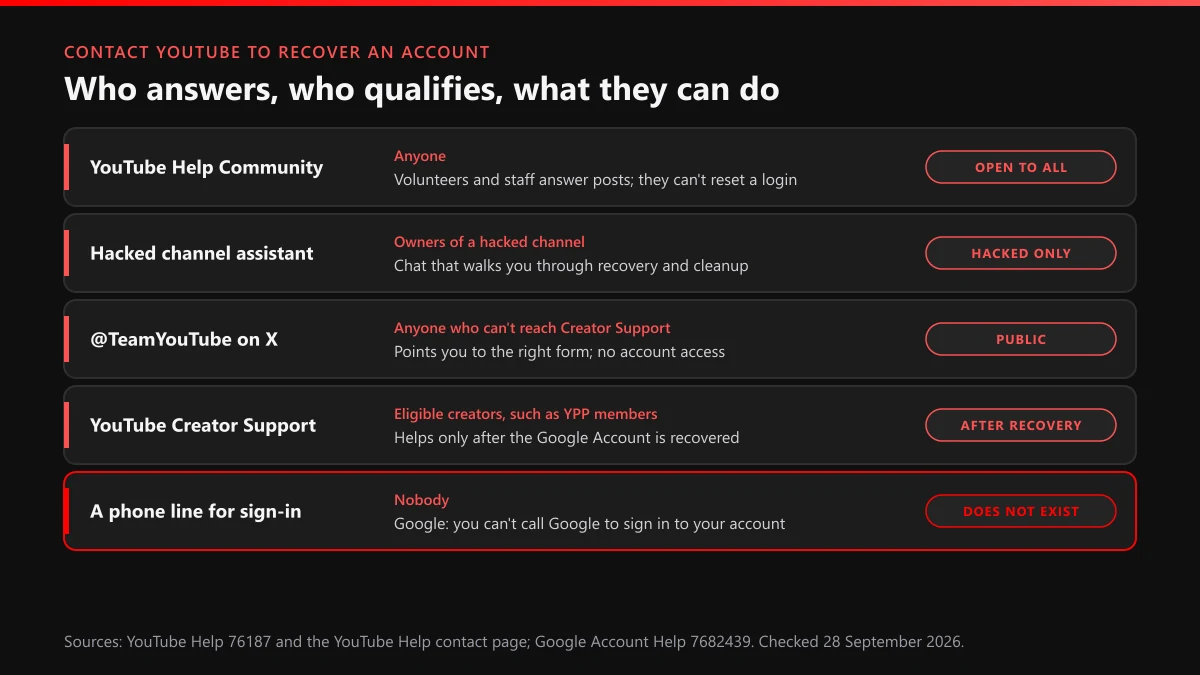
- YouTube Help Community. Open to anyone. Volunteers and TeamYouTube staff answer posts, which helps when you're unsure which form applies. They can't see or change your account.
- The hacked channel assistant. A chat linked from the top of YouTube's hacked channel page. It walks an owner through recovery and cleanup, and it expects the Google Account to be recoverable by you.
- YouTube Creator Support. For eligible creators, "such as one in the YouTube Partner Program," and only once "you've already recovered your Google Account." It helps with the channel after the login is solved.
- @TeamYouTube on X. YouTube's page for getting help from TeamYouTube on X makes it the fallback for anyone who can't reach Creator Support. Never post your email address or phone number in a public reply.
Anything that looks like a direct line is a warning sign. Google's recovery tips say it "never asks for your password or verification codes over email, phone call, or message," and that you should "only enter your password or verification codes at accounts.google.com." A phone number in a search ad, a DM from an account with "support" in its handle, a comment promising a friend who works at Google: each of these is someone who wants the same access the original hacker had.
Who moves in on your channel while you're locked out?
Scammers, mostly, and they arrive fast. A creator who posts "my channel got hacked" usually gets replies within minutes from accounts offering paid recovery. Google's recovery help rules the whole trade out: "We don't work with any service that claims to provide account or password support." The same sellers tend to offer the reverse as well, and our teardown of the ban panels and bots sold as services shows what they actually deliver. Their other favourite product, the report bot, is taken apart in why mass-report bots don't do what they promise, and the same pattern turns up on Instagram with Instagram mass report tools and Instagram spam-report bots.
Each kind of scam has its own report route, and a precise report on a single item beats a vague one on a whole channel. Fake recovery replies go through reporting scam comments and reuploads. Paid ads promising to unlock accounts go through reporting scam ads that promise account unlocks, and a video selling "recovery" through flagging a single video. If you want to know what a reviewer does with your flag, what YouTube does with a report covers it. On your own channel, blocking a user from your channel keeps the same accounts out of your comments once you're back in.
Then there are the clones. Intruders often download a library before wiping a channel, and copies show up on new channels under your name. The videos are a copyright matter: taking down stolen copies of your videos sets the order, filing a YouTube copyright removal request covers the form, and getting one video taken down fast handles the upload that can't wait. A channel wearing your name and picture is an impersonation case, and what a channel report actually reviews explains which option to pick. Where the clone trades on a registered brand, a trademark complaint against a counterfeit channel is also open, and taking down a channel that copies yours strings those routes together. For a copycat that clearly breaks the rules, the method in reporting a rule-breaking channel so it gets banned is the one that works.
YouTube Ban Service doesn't recover Google Accounts and never handles a client's login. We report the clones, fake support comments and scam uploads that gather around a locked-out creator, through YouTube's official routes, and YouTube makes every decision. A fan page that says what it is breaks no rule, and we leave it alone. Our YouTube content removal help sets out what we take on.
What makes the next recovery a two-minute job?
Details you add while you still have access. Recovery is quick when Google can send a code somewhere you control, and slow when it can't. The same code keeps intruders out: in Google's May 2019 study, an SMS code to a recovery phone stopped 96% of bulk phishing attacks and 76% of targeted ones. Since 15 October 2025 Google also lets you name recovery contacts, people who confirm a code on their own device during a recovery; you can add up to 10, according to Google's recovery contacts help. Once you're back in, do these in one sitting:
- Add a current recovery phone and a second recovery email you actually read.
- Turn on 2-Step Verification, then print backup codes and keep them away from the laptop.
- Add two recovery contacts who pick up the phone quickly.
- In YouTube Studio, remove every channel permission you don't recognise and give a trusted second person access, so one lost login never locks out the whole channel.
If a clone or a scam channel is already live while you work through this, send its link through our contact page, and browse every guide in our YouTube solutions library for whatever else the takeover left behind.
FAQ
Is there a YouTube account recovery form separate from Google's?
No. A YouTube login is a Google Account login, so the only form that resets it is Google's at accounts.google.com/signin/recovery. YouTube's own forms start later: the hacked channel assistant, Studio's cleanup tool and the termination appeal all expect the Google Account to be back in your hands first.
How long does it take to recover a YouTube account?
Anywhere from a minute to several days. A code sent to a recovery phone you still hold usually ends it on the spot. Without one, Google may take days, and a recovery phone or email you changed recently can take up to 7 days to count. Retry from your usual device rather than a new one.
Can I get back a channel that was hacked a year ago?
Probably not with YouTube's help. YouTube limits hacked-channel support to incidents from the past 9 months because of its data retention policy, and says that for anything older it may not be able to recover the channel. You can still recover the Google Account itself through Google's form.
Can a deleted YouTube channel be recovered?
No. YouTube says closing a channel permanently deletes its videos, comments, messages, playlists and history. A hidden channel is different: you restore it by going to create a channel on the same account and filling in the form, and the hidden content comes back.
Does YouTube have a phone number for account recovery?
No. Google's recovery help says you can't call Google for help signing in, and Google never asks for a password or verification code by email, phone call or message. Any number advertised as YouTube recovery support belongs to someone else, usually a scammer.
I got my account back but the channel shows a termination notice. What now?
File the termination appeal, but only after the recovery is complete and the account is secured. YouTube warns an appeal may not be accepted if recovery is incomplete. Creators have up to 1 year from the termination date to appeal, and there is a limit on how many appeals one termination allows.
Should I pay someone who says they can recover my YouTube account?
No. Google says it doesn't work with any service that claims to provide account or password support, so nobody outside Google can push a recovery through. Anyone asking for your password, a sign-in code or remote access is setting up a second takeover.