7 October 2026 · YouTube Ban Service · ~10 min read
How to claim a handle on YouTube, and what to do when the name you want sits unused
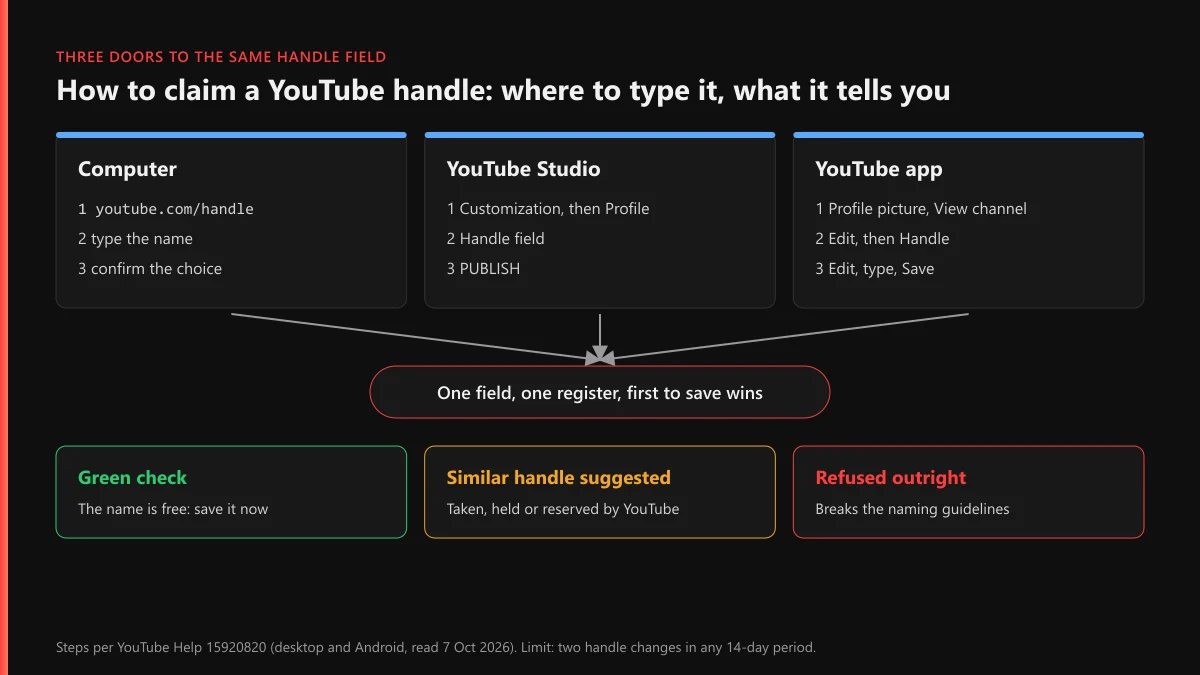
To claim a handle on YouTube, open youtube.com/handle on a computer, or in the app tap your profile picture, View channel, then Edit, and type the name under Handle. If YouTube shows it as available, save it. There's no reservation list or waiting queue: whoever saves a free handle first owns it, and dormant channels keep theirs.
How to claim a handle on YouTube from a computer
Sign in first, and sign in as the right channel. Anyone searching "how to claim handle on YouTube" with a Brand Account on the same login can set the name on the wrong channel without noticing, because the field only acts on whichever channel is active. Click your profile picture, check the channel name at the top, and switch if needed. Then use either door below. Both write to the same register that the app uses.
- Go to youtube.com/handle, which opens the handle picker for whichever channel is active.
- Or open YouTube Studio, choose Customization in the left menu, then the Profile tab. The current handle sits under Handle.
- Type the name you want. Capitals don't matter, since @Name and @name are one handle. Periods, underscores, hyphens and numbers are allowed.
- Wait for the verdict under the field. A free name gets a check mark. A held one brings a suggestion, such as the same word with digits on the end.
- Confirm on the handle page, or click PUBLISH in Studio. Your old handle is then held for your channel for 14 days.
The rules on what you can type live in YouTube's handle naming guidelines: 3 to 30 characters, nothing that looks like a URL or a phone number, and nothing violent, offensive or spammy. Publish only the name you've settled on. YouTube allows two handle changes in any 14-day period, so test candidates by typing them, not by saving them.
How to claim a YouTube handle on the app
The phone route has more taps and the same outcome. YouTube's handle help page for Android lists these steps, and the iPhone app follows the same menus:
- Open the YouTube app and tap your profile picture.
- Tap View channel, then Edit (the pencil).
- Find the Handle section and tap Edit next to it.
- Type the name. If it isn't free, the app offers a similar one instead.
- Tap Save.
People who look up how to claim YouTube handle on app usually hit one snag: the app shows only the channel tied to the account currently selected in the app, so a Brand Account has to be switched to under your profile picture before step two. The 14-day limit is shared across devices too, so a change made on your phone counts against a change you later try in Studio.
Can you reserve a handle, and what does "YouTube handle reserved" mean?
You can't reserve one in the sense most people mean. Searches like "reserve YouTube handle" and "YouTube reserve handle" assume a waitlist, a hold or a backorder, the way domain registrars sell them. YouTube has none of that. The only way to hold a name is to set it on a channel you own, and a channel costs nothing to create, so that is the practical way to claim a YouTube handle for a future project: make the channel, set the handle, and leave it empty until you're ready.
"Reserved" does show up in three real situations, and none of them puts you in a queue:
- The 2022 launch. When YouTube introduced handles on 10 October 2022, it let channels pick in waves, ordered by "overall YouTube presence, subscriber count and whether the channel is active or inactive." Channels with a personalized URL got that URL as their default handle automatically. That is why so many common words were gone before most people saw the option.
- The 14-day hold. After a channel changes its handle, the old one stays reserved for that channel in case it switches back, then opens to everyone.
- Names YouTube keeps. Some words load YouTube's own pages rather than a creator's channel, and the guidelines say YouTube "reserves the right to change, reclaim, or remove a handle at any time."
YouTube handle taken but not used: what did 27 dormant-looking names show?
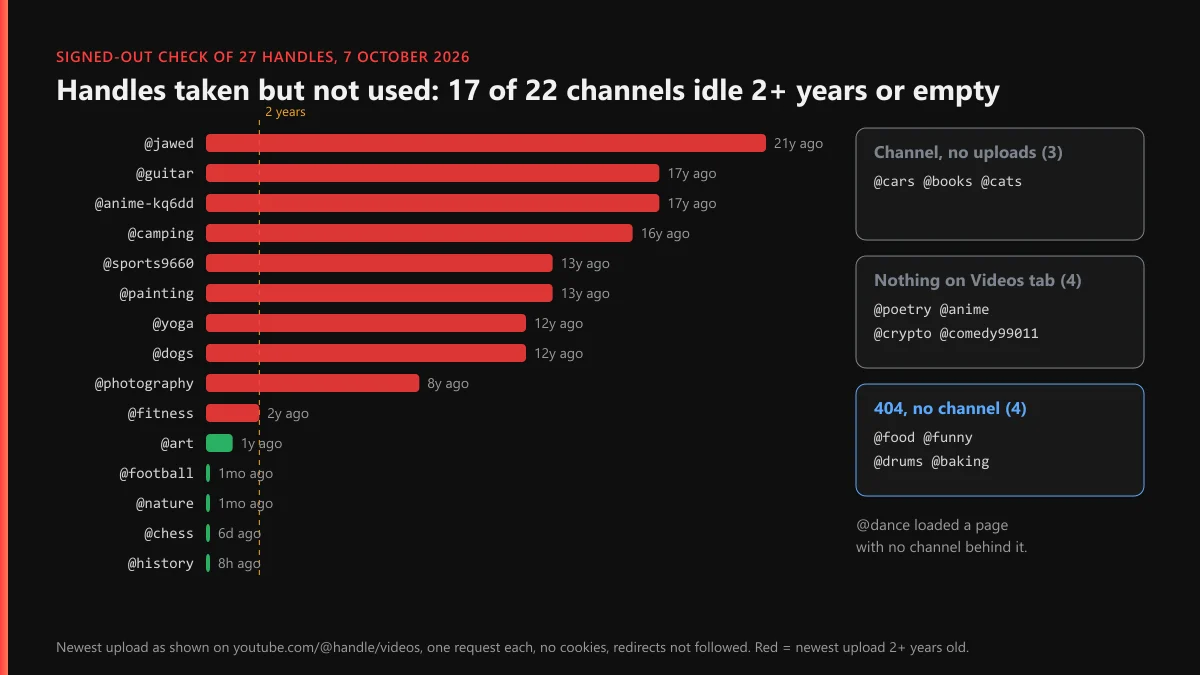
We wanted a straight answer to the question behind most of these searches: does an abandoned channel keep its handle? On 7 October 2026 we requested 27 handles at youtube.com/@handle/videos, signed out, one request each, without following redirects. The list mixed everyday words, three numbered handles from legacy channels, and @jawed, the account behind "Me at the zoo", the first video ever uploaded. For each page that loaded, we read the channel ID and the age of the newest upload from the Videos tab, which sorts newest first.
| What the page showed | Handles | Count |
|---|---|---|
| Channel, newest upload 2 or more years old | @jawed (21y), @guitar (17y), @anime-kq6dd (17y), @camping (16y), @sports9660 (13y), @painting (13y), @yoga (12y), @dogs (12y), @photography (8y), @fitness (2y) | 10 |
| Channel, newest upload within 2 years | @art (1y), @football (1mo), @nature (1mo), @chess (6d), @history (8h) | 5 |
| Channel says it has no content | @cars, @books, @cats | 3 |
| Channel, nothing on the Videos tab | @poetry, @anime, @crypto, @comedy99011 | 4 |
| 404, no channel | @food, @funny, @drums, @baking | 4 |
| Page with no channel behind it | @dance | 1 |
So 22 of the 27 handles belonged to a channel, and 17 of those 22 (77%) either hadn't uploaded in two years or showed nothing on the Videos tab. We expected a few sleepers. We got a majority. @jawed still holds its name with one video and 6.66 million subscribers, 21 years after its only upload. @painting has 47 subscribers and two videos from 13 years ago. Both handles are as taken as @history, which posted eight hours before our check.
A YouTube handle taken but not used is still taken, then. Activity doesn't decide who keeps a name; the channel's existence does. Four words did come back as 404 at the address, but that doesn't make them free. Only the signed-in handle field can say whether @food is open or held by a hidden, deleted or terminated channel.
Does YouTube delete inactive accounts and release their handles?
Not for channels with videos. There is no separate YouTube inactive account policy. The rule that applies is Google's, because every channel sits on a Google Account. Google's inactive account policy says an account "that has not been used within a 2-year period" counts as inactive and may be deleted, and that "December 1, 2023 is the earliest a Google Account will be deleted due to this policy." The trigger is low. Watching one YouTube video while signed in counts as activity, and so does a single Google search.
The exception is the part that matters for handles. When Google announced the change, Ruth Kricheli, its VP of product management, wrote on the Google Keyword blog on 16 May 2023: "we do not have plans to delete accounts with YouTube videos at this time." Our check fits that. Ten channels last posted two or more years ago and all ten still answer at their handle.
The gap is the empty channel. An account with no uploads, idle for two years, falls under the policy, and if Google deletes it, the handle eventually returns to the pool. Google warns the owner by email first and publishes no date for the handle's release afterwards.
How long until a YouTube handle becomes available again?
That depends entirely on why the holder let go, and only one of the clocks below is official. People asking how long until YouTube handle is available are usually staring at a name that won't free up, so start by working out which row you're in.
| How the name was let go | Wait before anyone can claim it | Status of that figure |
|---|---|---|
| Channel changed to a different handle | 14 days | Official, YouTube Help |
| Channel deleted by its owner | About 30 days, or 60 | Unofficial: TeamYouTube on X; a Product Expert guide |
| Google Account deleted for 2 years of inactivity | 2 years idle, warnings, then an unpublished wait | Policy official; handle timing not published |
| Channel terminated or hidden | Not published | No figure exists |
| Channel still exists, however quiet | Never, while it exists | Our check, 7 Oct 2026 |
The deleted-channel row is the one people argue about. A TeamYouTube reply on X said a deleted channel's handle usually takes about 30 days to come back. A Diamond Product Expert's YouTube Community guide from February 2025 reported 60. Neither number appears on a help page. And none of the clocks is visible from outside, since you can't see when another channel made its change. A released name also goes to whoever types it first, with no priority for the person who waited longest.
How to claim a YouTube channel name, and why nobody can own one
Channel names work differently from handles. Two channels can share a name, so there's nothing to claim in the exclusive sense. YouTube's launch post said it directly: "Unlike channel names, handles are truly unique." A search for "claim YouTube channel name" usually comes from someone who saw their name on another channel. They can still use it on their own.
To set or change the display name, open YouTube Studio, go to Customization, then Profile, edit Name and click PUBLISH. In the app, it's the same Edit screen as the handle. YouTube caps name changes at two in 14 days, and a verified channel loses its check mark when the name changes. If the name is your brand and another channel uses it to pass itself off as you, the fix is a report, not a claim. A trademark complaint or an impersonation report goes to YouTube's policy teams; the handle field plays no part. Our older explainer on YouTube usernames versus handles covers what YouTube will and won't reassign.
What if the account sitting on your name breaks the rules?
Then you have a case, and the handle comes along only as a side effect. The routes depend on who holds the name.
When the dormant handle is on your own old channel
If you can sign in, change the old channel's handle, wait 14 days, and claim it on the new one. If you can't, the problem is access, not naming. Start with getting a locked YouTube account back, recovering the Gmail account underneath it, or recovery when the old email address is gone. Before paying anyone, read what channel recovery should cost and how paid recovery services actually operate. If YouTube banned that channel, the name stays with it until a ban appeal succeeds or the account is gone, and termination and deletion follow different rules. A reinstated channel that earned money needs a separate monetization appeal. Deleting the old channel also frees the name, but the wait afterwards has no published end.
When an active impostor holds it
A channel using your name, photo and branding to pass as you breaks YouTube's impersonation policy. Read what a channel report is reviewed against and use the hijacking and defamation reports when false claims come with it. Reuploads of your work call for a copyright removal request. Each valid one can add to the copyright strikes that end a channel at three, while a Content ID claim works differently from a strike. For the evidence, see taking down a stolen video.
Impostors rarely stop at one thing. Use the scam and ad reports for fake giveaways run in your name and the counterfeit and misinformation forms for knock-off merchandise. Abuse aimed at you falls under YouTube's harassment policy, and a leaked address or phone number needs a privacy complaint. For single items there's reporting a single video, flagging reuploads and comment spam and getting one upload removed, and what happens after you press Report sets expectations. When the whole channel exists to deceive, a full channel takedown is the end point, and the bar YouTube sets before banning a channel tells you how much evidence that takes.
Why buying or mass-reporting the name fails
The handle guidelines prohibit "the sale and transfer of handles", so a seller can't legitimately move one to you. Getting an innocent holder removed so the name frees up is false reporting, whatever the tool. That includes YouTube mass-report bots, the ban panels sold in Telegram groups, and the Instagram spam-report bots and Instagram mass-report tools people try when the same person holds the name there too. Removal follows a real violation, which is what what it really takes to get a channel banned spells out.
If the holder is impersonating you, reuploading your videos or running scams, that's the work our YouTube content removal service does. Send us the channel link, browse the full list of our YouTube guides, or read how YouTube Ban Service takes on cases: genuine violations, official channels, and never a channel whose only offence is owning the name first.
FAQ
When does a YouTube handle become available again?
Only when its holder lets go. A handle swapped for another one is released after 14 days, by YouTube's own help page. A deleted channel's handle comes back after a wait YouTube doesn't publish. A channel that simply stops posting keeps its handle, however old the last upload is.
How long until a YouTube handle is available after its owner deletes the channel?
There's no official figure. A TeamYouTube reply on X put it at about 30 days, and a Diamond Product Expert on the YouTube Community reported 60 days in 2025. Check the field again after two months rather than every morning.
Can I claim my YouTube handle back from an old channel I no longer use?
Yes, if you can still sign in to that old channel. Change its handle to something else, wait out the 14-day hold, then set the freed name on the new channel. The name is open to everyone once the hold ends, so be ready on day 15.
Will YouTube hand me an inactive handle if I ask?
No. YouTube's help pages describe no request form for taking a handle from another channel, and its handle guidelines prohibit the sale and transfer of handles. An idle channel isn't breaking any rule by keeping its name.
Is there a waitlist to reserve a YouTube handle?
No. YouTube runs no waitlist, alert or backorder for handles. The only way to hold a name is to set it on a channel you own, and anyone else can take a free name the moment before you do.
Does setting a handle in the app differ from setting it on a computer?
Only in the menus. The app, YouTube Studio and youtube.com/handle all write to the same register and follow the same naming rules, and each change counts toward the same limit of two changes in any 14-day period.