4 October 2026 · YouTube Ban Service · ~11 min read
How to check if a YouTube channel name is taken before you commit to it
To check if a YouTube channel name is taken, start with the @handle: type it into the Handle field in YouTube Studio, the only place YouTube itself says yes or no. Then search the display name under YouTube's Channels filter, since names can repeat. Last, look the name up in a trademark database before you put it on merch.
Is my YouTube channel name taken, or just my handle?
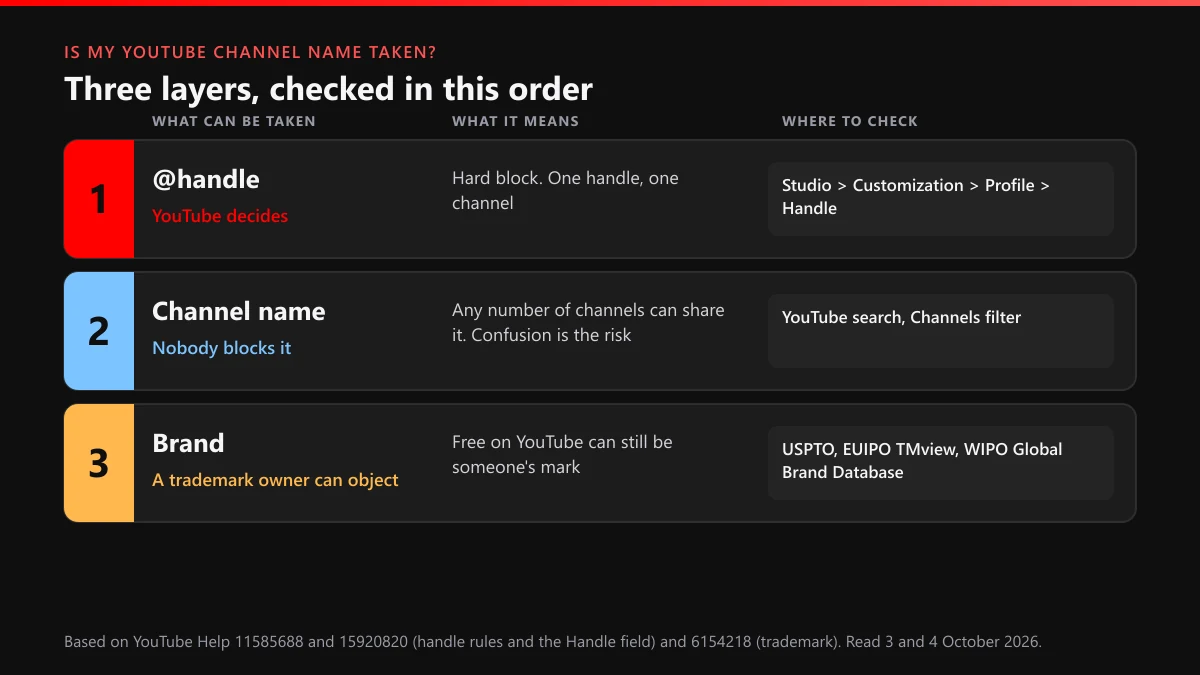
Most people asking this hold one string in their head and treat it as one name. YouTube splits it in two, and trademark law adds a third reading. The @handle is the address, youtube.com/@yourname, and it belongs to exactly one channel. The channel name is the label on your page and under your videos, and any number of channels can share it. The brand is the name as a trademark, a layer that sits outside YouTube's systems altogether.
So "is this YouTube channel name taken" has three answers, and they often disagree. A handle can be free while the same words are a registered mark somewhere. A display name can be on forty channels while the matching handle is still open. Checking one layer and assuming the other two is how people end up renaming a channel six months in.
| Layer | Can someone else hold it? | Who can say no | Where you check |
|---|---|---|---|
| @handle | Yes, and only one channel at a time | YouTube, in the Handle field | YouTube Studio > Customization > Profile > Handle, or youtube.com/handle |
| Channel name | No. Names repeat freely | Nobody, unless the name is used to deceive | YouTube search with the Channels filter |
| Brand (trademark) | Yes, through registration or prior use | The mark's owner, through a trademark complaint | USPTO Trademark Search, EUIPO TMview, WIPO Global Brand Database |
How to check if a YouTube channel name already exists as a handle
The handle check is the one with teeth, and YouTube runs it for you. The handle naming guidelines set the limits before anyone else's claim matters: 3 to 30 characters for most scripts, nothing "URL-like or phone number-like", and a reminder that YouTube "reserves the right to change, reclaim, or remove a handle at any time." Inside those rules, the Handle field gives a live answer.
- Open YouTube Studio. Sign in to the Google Account that owns the channel and open YouTube Studio.
- Find the Handle box. Go to Customization, then Profile, and find the Handle box. With no channel yet, youtube.com/handle opens the same picker once you're signed in.
- Type the handle and read the message. Type the handle you want and wait for the message under the box. A taken or rule-breaking handle is refused right there, before you can publish.
- Try a variant if it's refused. If it's refused, try a variant. YouTube's handle help suggests you "Try adding periods, numbers, or underscores".
- Publish only when it's accepted. Publish only when the box accepts it, and remember the limit: two handle changes in 14 days, with your old handle held for 14 days after each change.
The suggestion in step 4 comes straight from YouTube's page on choosing and changing your handle. Searches phrased as how to check YouTube channel name already exists usually mean this box, whether the person typing knows it or not. Everything else on this page is either a guess about what the box will say or a question it can't answer.
We tried YouTube's fallback advice on eight common words
Search "how to check if YouTube channel name is taken" or "how to check if YouTube name is taken" and most answers stop at the same tip: add a number, a period or an underscore. On 4 October 2026 we tested how far that gets you. We took eight words a new channel might want (gaming, cooking, travel, fitness, music, comedy, tech and vlog) and built six handles from each: the bare word, the word plus 1, "the." in front, "_tv" on the end, ".channel" on the end, and the word plus 2026. That made 48 addresses. Each got one signed-out request to youtube.com/@handle, no cookies, and we wrote down whether a channel loaded.
30 of the 48, or 62.5%, opened a live channel. The year suffix was the most crowded pattern: all eight word2026 handles already belong to someone, a 100% miss rate. The word_tv form was gone for 7 of 8 words (87.5%), word.channel for 6 (75%), word1 for 5, and the bare word for only 4, exactly 50%. The trick people reach for first was the one that failed every time.
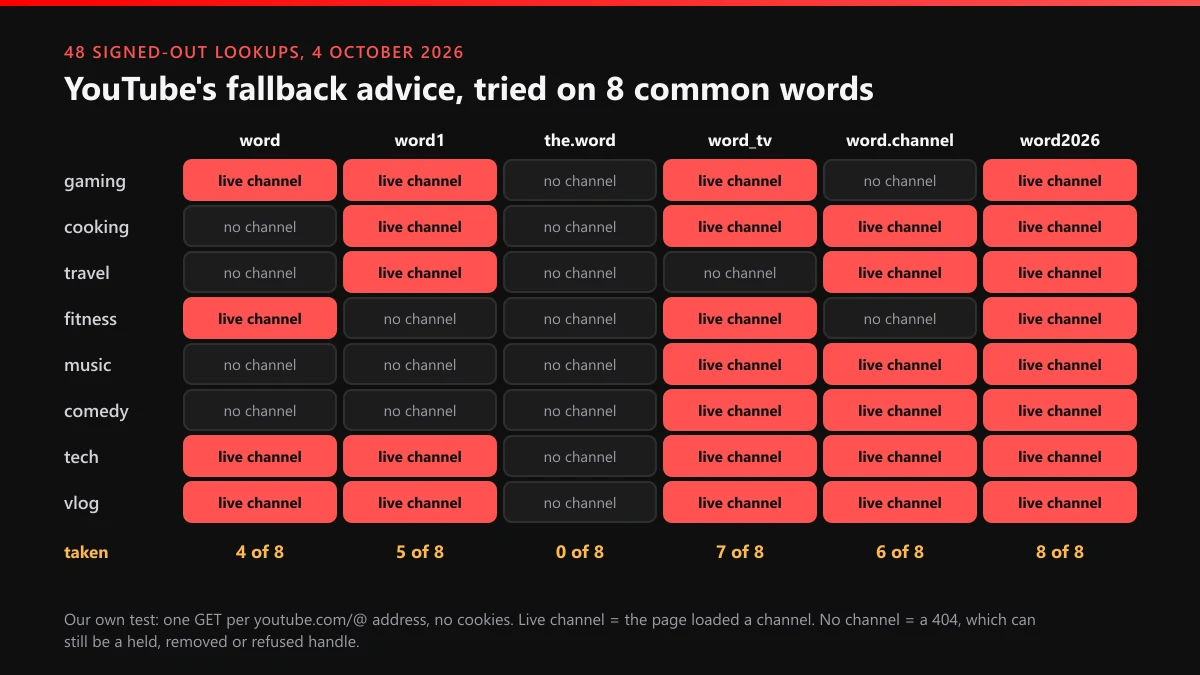
Two results deserve a second look. Every "the.word" handle came back empty, 0 of 8, which looks like an open door. For five of them it probably isn't: cooking, travel, fitness, music and tech are all live top-level domains in the IANA root zone database, so "the.music" reads exactly like a web address. Yet six live channels sit on handles ending in ".channel", and .channel is a domain ending too. Whatever "URL-like" means inside YouTube, it isn't a simple suffix match, so only the Handle field can say which side of the line your idea falls on.
The bare words tell a similar story. @music, @comedy, @cooking and @travel loaded no channel at all, and a signed-out request can't tell a never-used handle from one that's held, removed or reserved. Names and handles drifted apart too: @tech belongs to a channel called TechSmartt, and @travel.channel to an Arabic match-highlights channel. Is this YouTube name taken? A live page settles it. An empty one settles nothing until the box agrees.
How to know if a YouTube channel name is taken as a display name
Strictly, it never is. The display name is a label, and YouTube doesn't stop two channels from using the same one. When handles launched on 10 October 2022, YouTube's announcement called them "truly unique to each channel", which is the property names never had. What you're really checking is whether the name is crowded, or already tied to a channel your viewers would mistake you for.
See if a YouTube channel name is taken in your niche
Search the exact name on YouTube, open Filters, pick Channels and scan the first two screens. On each result, read three things: the handle under the name, the subscriber count and the topic. A namesake in another language and another niche costs you nothing. A channel with your name, your topic and a bigger audience is a real problem even though YouTube will let you go ahead, because search will rank it above you and your viewers will leave comments in the wrong place. A web search for the name in quotes plus the word YouTube catches channels that YouTube's own search buries.
One shortcut to avoid: if the name matches a bigger channel and you plan to stand out by adding "Official" or "Real", stop there. YouTube's impersonation policy lists add-ons like those as signs of a channel posing as someone else.
Can a YouTube name be free and still not yours to use?
Yes, and most guides skip this layer. YouTube's trademark policy defines infringement as "improper or unauthorized use of a trademark in a way that is likely to cause confusion as to the source of that product." A handle the box accepts can still be someone's registered mark, and the owner can file through YouTube's trademark complaint form. Add the reclaim clause from the handle rules and you have two ways to lose a name you thought was settled.
Before you print anything, look the name up in the free databases: the USPTO Trademark Search for the United States, EUIPO's TMview for EU and many national offices, and WIPO's Global Brand Database for international filings. Search the exact words and near spellings, then look at the classes, because a mark for clothing is a different risk from one for entertainment or online video. A hit doesn't automatically block you, and no hit isn't legal clearance. If income depends on the name, a lawyer's clearance search costs less than a rebrand.
Keep trademark and copyright apart. A name is a trademark question. Your videos are a copyright question with their own routes: a takedown for a stolen upload, a formal copyright removal request, the Content ID claim process, and the copyright strike that follows a valid notice.
What if the name is taken by a channel posing as you?
Then the issue isn't availability, it's deception, and YouTube has routes for that. A channel copying your name and look to pass as you is impersonation, and you can file a channel-level takedown report. If it uses your real personal name without consent, a privacy complaint may fit better. A channel set up to mock or target you falls under the harassment and cyberbullying rules. Using your name to push fake offers belongs with reports of scam ads and channels or counterfeit goods and misinformation, and a channel claiming to be your hijacked account or spreading false claims about you is covered under hijacking and defamation reports.
Reports are read against policy, not counted. What reviewers check on a channel report and what happens after a video report point the same way: one well-evidenced report beats fifty thin ones. For single uploads, start with how to report a YouTube video or the fuller path to getting a video taken down. Re-uploads of your work and comment spam have their own reporting route, and when many videos across channels need clearing, a content removal service takes on the paperwork.
What doesn't work is freeing a name by knocking out whoever holds it. A YouTube mass report bot and the bots and panels sold as ban services rely on volume, and volume is exactly what YouTube discounts. Advice on getting someone banned from YouTube or on banning someone's channel only holds when the channel really breaks the rules. The same bot pitch circulates for Instagram as a mass report tool and an Instagram spam report bot, with the same flaw. And even if a channel is terminated, nothing YouTube publishes says its handle passes to you.
Is your own old YouTube name taken now?
After a handle change, the old one is held for 14 days and then any channel can pick it. After a channel deletion, TeamYouTube told a user on X that the handle is usually available again after about 30 days, which is support guidance rather than a Help article. If you're thinking of starting over, read what deleting a YouTube channel does before you press anything. For a terminated channel YouTube publishes no release timeline at all, one more reason to contest a terminated or deleted channel or appeal the ban rather than wait for the name.
If the channel still exists but you can't sign in, the name is still yours and the job is getting back in. Start with recovering your YouTube account, the Gmail side of recovery, or recovery without the old email. Before paying anyone, read what channel recovery costs and how a legitimate channel recovery service should work. A demonetized channel keeps its name as well; that fight runs through a monetization appeal.
Buying the handle from whoever holds it isn't a route either. YouTube's handle guidelines list "The sale and transfer of handles" among the things not allowed. If what you want is an old-style username, here's how claiming a YouTube username works today.
The order we'd run it in today
Open the Handle field first, since it's the only check that ends in a yes. Keep three or four variants ready and skip the year suffix, which was gone in all eight of our tests. Then search the display name and decide whether you can live with the namesakes. Then spend five minutes in a trademark database. That's how to check if your YouTube name is taken, and how to check if a YouTube name is taken in the legal sense too, before the logo is printed. If someone is already using your name to deceive people, our library of YouTube reporting guides covers each route, the YouTube Ban Service home page explains how case handling works, and you can contact us about a specific channel.
FAQ
Is my YouTube name taken if another channel already displays it?
Not in any way that blocks you. Channel names can repeat, so YouTube lets you use a name another channel shows. Only the @handle is unique, and the Handle field in YouTube Studio is where you find out whether yours is free.
How do you check if a YouTube name is taken without signing in?
Open youtube.com/@ followed by the name. If a channel loads, that handle is taken. If you get a 404, the handle may be free, held after a change, removed or blocked by the naming rules, and only the Handle field can confirm which.
Does adding a year or a number make a handle easier to get?
Less than you'd think. In our 48 signed-out lookups on 4 October 2026, every word-plus-2026 handle we tried already belonged to a channel, and word-plus-1 was taken for five of the eight words.
Can a YouTube handle end in .tv, .music or another domain ending?
YouTube's rules refuse handles that look like a web address, and .tv and .music are real domain endings. Yet we found six live handles ending in .channel, also a domain ending, so test the exact string in the Handle field.
Can I buy a YouTube handle that someone else has?
No. YouTube's handle guidelines list the sale and transfer of handles as not allowed, and YouTube can reclaim a handle at any time. Pick a variant the Handle field accepts instead.
Do I need a trademark search for a small YouTube channel?
It isn't required, but it's cheap insurance. A free handle can still be someone's registered mark, and YouTube takes trademark complaints about use likely to confuse viewers about the source. The USPTO, EUIPO TMview and WIPO databases are free to search.
How long until a handle someone dropped becomes free?
Fourteen days after a handle change, the old handle opens to other channels. For a deleted channel, TeamYouTube support has said it's usually about 30 days. For a terminated channel, YouTube publishes no timeline.